

Forumda Paylaşıldımı Görmedim Eğer Paylaşıldıysa Raporlayınız.
İyi Kullanımlar
İyi Forumlar...
İyi Kullanımlar
İyi Forumlar...
Ziyaretçiler için gizlenmiş link,görmek için üye olmalısınız!
Giriş yap veya üye ol.
Ziyaretçiler için gizlenmiş link,görmek için üye olmalısınız!
Giriş yap veya üye ol.
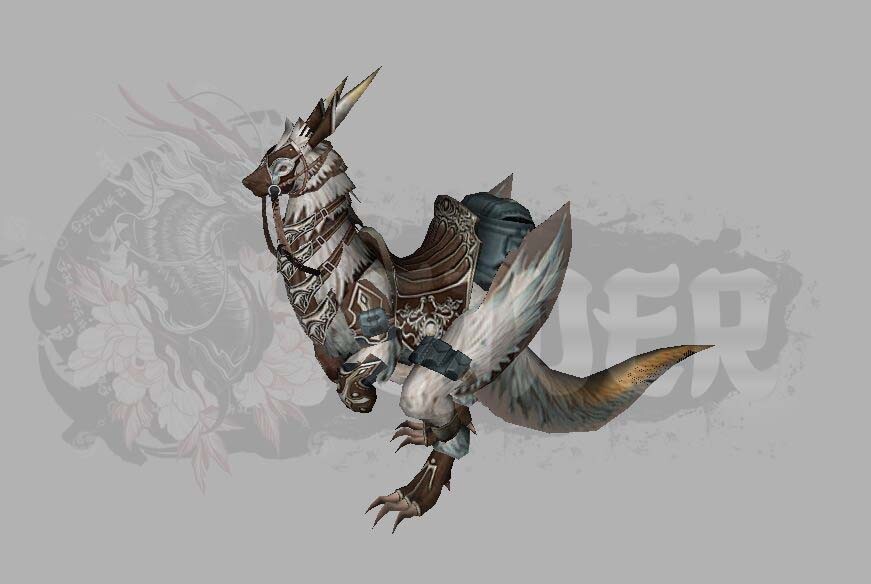
EJDER-Binek [2] Serisi: Metin2 3D Modelleme ile Yeni Boyutlar
Metin2 oyununda EJDER-Binek [2] gibi özel ve dikkat çeken binek modelleri, oyun deneyimini estetik ve teknik açıdan zenginleştirmektedir. Bu model, hem görsel açıdan etkileyici hem de teknik olarak optimize edilmiş bir yapıya sahiptir. Bu yazıda, Metin2 için özel 3D modelleme süreçleri üzerinden EJDER-Binek [2] modelini inceleyeceğiz. Ayrıca bu modelin gr2 formatında nasıl dışa aktarıldığı, texture ve UV mapping süreçleri, Blender veya 3ds Max gibi yazılımlarla nasıl düzenleneceği ve model değiştirme (replace) yöntemleri hakkında detaylı bilgiler sunacağız.
Metin2 Binek Modelleri ve Görsel Etki
Metin2 oyunu, özellikle görsel yönüyle oyuncuların dikkatini çekecek birçok özel model barındırır. Bu modellerden biri olan EJDER-Binek [2], hem mevcut sistemle uyumlu olacak şekilde tasarlanmış hem de yüksek detay seviyesiyle dikkat çekmektedir. Bu binek modeli, Metin2 3D model geliştirme sürecinde örnek alınabilecek niteliktedir.
3D modelleme dünyasında Metin2 için özel olarak geliştirilen bu tür modeller, genellikle granny3d (gr2) formatında hazırlanır. Bu format, oyun motoru ile uyumlu çalışması açısından büyük önem taşır. Gr2 export ve import işlemleri sırasında dikkat edilmesi gereken teknik detaylar, modelin doğru çalışmasını sağlar.
Blender ve 3ds Max Kullanımı
Metin2 için 3D model geliştirmek isteyenler genellikle Blender veya 3ds Max gibi yazılımları tercih ederler. Blender Metin2 eklentileri sayesinde, gr2 formatına dönüştürme işlemi daha kolay hale gelir. Benzer şekilde, 3ds Max Metin2 araçları da model edit işlemlerinde yardımcı olur.
EJDER-Binek [2] modeli, bu yazılımlarda mesh, bone ve rigging yapıları ile tamamen hareket ettirilebilir hale getirilmiştir. Bu sayede, modelin animation (animasyon) süreçleri de daha gerçekçi hale gelir. UV mapping ile texture uygulamaları, modelin görsel kalitesini artırır.
Model Değiştirme ve Özel Paketler
Metin2 oyununda model replace işlemi yapmak isteyen kullanıcılar, EJDER-Binek [2] gibi modelleri custom model olarak kullanabilirler. Bu işlem genellikle eterpack veya Martysama tarzı paketlerle yapılır. Eter kavramı, Metin2’de özel efekt ve model içeriklerini barındıran sistemdir. Eterpack ile birlikte, modelin uygun şekilde oyun içine entegrasyonu sağlanabilir.
Metin2 geliştiricileri için hazırlanan Metin2Dev model sistemleri, bu tür özel modellemelerde referans alınan kaynaklardır. NPC model, monster model, character model, hatta building model gibi farklı yapılar için benzer yaklaşımlar uygulanabilir. Effect model ve map object gibi yapılar da aynı prensiplerle oluşturulur.
Teknik Detaylar ve Geliştirme Süreçleri
EJDER-Binek [2] modeli, hem teknik hem de sanatsal yönden dengeli bir yapıya sahiptir. Metin2 formatına uygun olarak dışa aktarılmıştır ve gr2 dosyası olarak sisteme entegre edilebilir. Texture dosyaları, genellikle DDS formatında olup, skin ve visual mod sistemleriyle birlikte kullanılır. Graphic mod içerikleri ile birlikte modelin görsel etkisi daha da artar.
Metin2 dünyasında terrain (arazi) ve dungeon model gibi yapılar da bu modelleme teknikleriyle birlikte geliştirilir. Map model oluşturma süreçleri, oyun haritasının görsel bütünlüğü açısından büyük önem taşır. Object modelleri ise oyun içindeki interaktif öğeleri temsil eder.
Sonuç
EJDER-Binek [2], Metin2 oyununda görsel zenginliği artırmak için ideal bir örnektir. 3D modelleme, texturing, animation, rigging ve export gibi tüm aşamalar titizlikle ele alınmıştır. Metin2Lobby.com olarak, bu tür modellerin geliştirilmesi ve paylaşılması konusunda topluluğu desteklemeye devam ediyoruz.
Dragon-Mount [2] Series: New Dimensions with Metin2 3D Modeling
Metin2 game features special and eye-catching mount models like Dragon-Mount [2], which enrich the gaming experience both aesthetically and technically. This model has an impressive visual structure and is technically optimized. In this article, we will examine the Dragon-Mount [2] model through specialized 3D modeling processes for Metin2. Additionally, we will provide detailed information on how this model is exported in gr2 format, texture and UV mapping processes, how it can be edited with software such as Blender or 3ds Max, and techniques for model replacement.
Metin2 Mount Models and Visual Impact
Metin2 includes many special models that attract players visually, including the Dragon-Mount [2]. This mount model is designed to be compatible with the existing system while featuring high detail levels, making it a reference for Metin2 3D model development.
In the world of 3D modeling, models specially developed for Metin2 are usually prepared in granny3d (gr2) format. This format is crucial for compatibility with the game engine. Technical details to consider during gr2 export and import ensure the model functions correctly.
Using Blender and 3ds Max
Those looking to develop 3D models for Metin2 often prefer tools like Blender or 3ds Max. With Blender Metin2 plugins, conversion into gr2 format becomes easier. Similarly, 3ds Max Metin2 tools assist in model editing operations.
The Dragon-Mount [2] model has been fully animated using mesh, bone, and rigging structures within these programs. As a result, its animation processes become more realistic. UV mapping and texture applications enhance the visual quality of the model.
Model Replacement and Custom Packages
Users wishing to perform model replacement in Metin2 can use models like Dragon-Mount [2] as custom models. This process is typically done using packages like eterpack or Martysama. The term Eter refers to systems in Metin2 that host special effects and model content. Integration of the model into the game can be achieved seamlessly with eterpack.
Metin2Dev model systems prepared for developers serve as references for such custom modeling. Similar approaches can be applied to different structures like NPC model, monster model, character model, and even building model. Structures such as effect model and map object are created following the same principles.
Technical Details and Development Processes
The Dragon-Mount [2] model has a balanced structure both technically and artistically. Exported compatibly with Metin2 format, it can be integrated into the system as a gr2 file. Texture files are generally in DDS format and used together with skin and visual mod systems. Visual impact increases further when combined with graphic mod contents.
Structures like terrain and dungeon model in the Metin2 world are also developed using these modeling techniques. Map model creation processes are essential for visual coherence of the game map. Object models represent interactive elements within the game.
Conclusion
Dragon-Mount [2] is an ideal example to enhance visual richness in Metin2. All stages, including 3D modeling, texturing, animation, rigging, and export, have been handled with care. As Metin2Lobby.com, we continue supporting the community in developing and sharing such models.
