

Forumda Paylaşıldımı Görmedim Eğer Paylaşıldıysa Raporlayınız.
İyi Kullanımlar
İyi Forumlar...
İyi Kullanımlar
İyi Forumlar...
Ziyaretçiler için gizlenmiş link,görmek için üye olmalısınız!
Giriş yap veya üye ol.
Ziyaretçiler için gizlenmiş link,görmek için üye olmalısınız!
Giriş yap veya üye ol.
Metin2 Oyununda EJDER-Binek [5] Modeliyle İlgili 3D Modelleme Rehberi
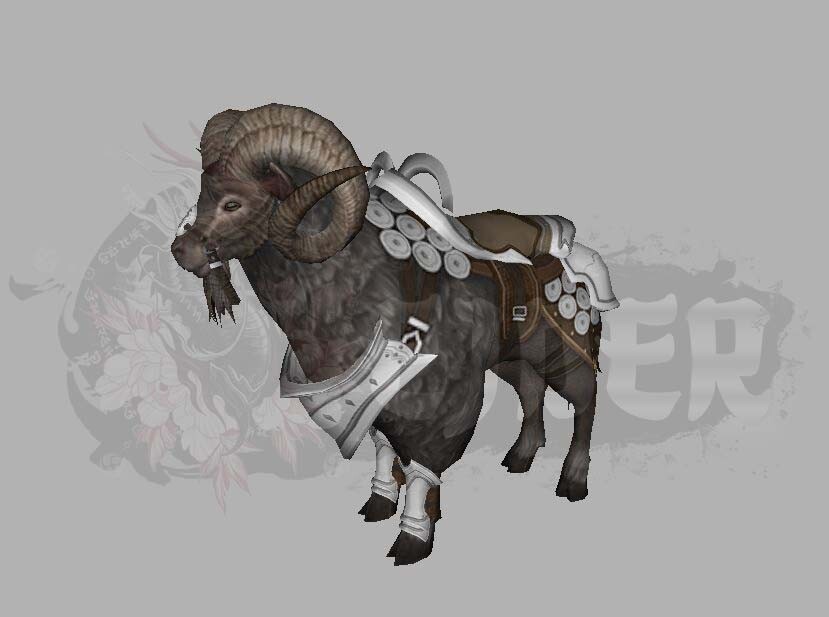
Metin2 oyun dünyasında EJDER-Binek [5] gibi özel ve nadir binek modelleri, oyuncuların dikkatini çeken görsel özelliklere sahiptir. Bu özel binek, hem estetik açıdan hem de oyun içindeki fonksiyonelliğiyle öne çıkar. Bu makalede, EJDER-Binek [5] modelinin 3D yapısı, Metin2 oyununda nasıl entegre edileceği, gr2 formatında nasıl dönüştürüleceği ve bu modelin texture, UV Map, rigging gibi teknik detaylarına değineceğiz.
EJDER-Binek [5] Modeli Nedir?
EJDER-Binek [5], Metin2 oyununun yüksek seviye karakterler için sunulan nadir bineklerden biridir. Bu binek, genellikle turnuvalarda veya özel etkinliklerde kazanılır. 3D modelleme açısından bakıldığında ise bu modelin detaylı dokuları, gerçekçi hareket animasyonları ve karakterle uyumlu tasarımı dikkat çeker. Bu nedenle, Metin2 için özelleştirilmiş modellemeler yapan geliştiriciler tarafından sıkça referans alınır.
Metin2 3D Modelleme Süreci
Metin2 için özel EJDER-Binek [5] modeli oluşturmak isteyenler, genellikle Blender ya da 3DS Max gibi yazılımlar kullanır. Modelleme sürecinde, mesh yapısı doğru şekilde oluşturulmalı, bone sistemine uygun rigging yapılmalı ve animation ile entegrasyon sağlanmalıdır. Bu süreçte, gr2 formatına dönüşüm kritik öneme sahiptir. GR2 Import/Export işlemleri doğru yapılmazsa, model oyun içine düzgün entegre edilemez.
Texture ve UV Mapping
EJDER-Binek [5] modelinin görsel olarak etkileyici olabilmesi için texture dosyalarının kaliteli olması gerekir. UV mapping işlemi, dokuların model yüzeyine doğru şekilde yerleştirilmesini sağlar. Metin2 formatına uygun olarak hazırlanan skin ve texture dosyaları, modelin oyun içinde doğal ve akıcı bir şekilde görünmesini sağlar.
Model Entegrasyonu ve Görsel Modlar[/BR][/BR]Metin2 oyununda custom model değişimleri yaparken, model replace işlemi dikkatle yapılmalıdır. EJDER-Binek [5] gibi özel modellerin doğru şekilde oyun içi yapıya entegrasyonu için, Metin2Dev veya MartySama gibi araçlar tercih edilir. Ayrıca, visual mod ve graphic mod sistemleriyle bu modelin daha da geliştirilmesi mümkündür.
Sonuç[/BR][/BR]EJDER-Binek [5] modeli, Metin2 oyununda hem estetik hem de teknik açıdan önemli bir yere sahiptir. 3D modelleme uzmanları için bu model, Metin2 için özelleştirme yaparken harika bir başlangıç noktası olabilir. Granny3D, GR2, Blender ve 3DS Max gibi yazılımlarla yapılan modelleme çalışmalarıyla, Metin2 deneyimi daha da zenginleştirilebilir. Bu süreçte, texture, UV Map, animation gibi teknik detayların doğru uygulanması büyük önem taşır.
3D Modeling Guide for EJDER-Binek [5] in Metin2
Metin2 features special and rare mount models like EJDER-Binek [5], which stand out with their visual appeal. This unique mount attracts players with both its aesthetic design and functionality within the game. In this article, we will cover the 3D structure of the EJDER-Binek [5] model, how it can be integrated into the Metin2 game environment, how it is converted into the gr2 format, and technical details such as texture, UV Map, and rigging.
What is the EJDER-Binek [5] Model?
EJDER-Binek [5] is one of the rare mounts offered in Metin2 for high-level characters. Typically obtained through tournaments or special events, from a 3D modeling perspective, this mount features detailed textures, realistic animations, and a design that harmonizes well with the game character. Therefore, it is frequently referenced by developers creating custom models for Metin2.
Metin2 3D Modeling Process
Developers who wish to create a custom EJDER-Binek [5] model for Metin2 typically use software such as Blender or 3DS Max. During the modeling process, the mesh structure must be properly created, rigging must be done according to the bone system, and integration with animation must be ensured. At this stage, conversion to the gr2 format is critical. If GR2 Import/Export operations are not handled correctly, the model cannot be properly integrated into the game.
Texture and UV Mapping
For the EJDER-Binek [5] model to appear visually impressive, its texture files must be of high quality. The UV mapping process ensures textures are placed correctly onto the model surface. Properly prepared skin and texture files compatible with Metin2 format allow the model to appear natural and fluidly within the game.
Model Integration and Visual Mods[/BR][/BR]When performing custom model swaps in Metin2, the model replace process must be carried out carefully. Tools such as Metin2Dev or MartySama are preferred for proper integration of special models like EJDER-Binek [5] into the game structure. Additionally, these models can be further enhanced using visual mod and graphic mod systems.
Conclusion[/BR][/BR]The EJDER-Binek [5] model holds significant importance in Metin2 both aesthetically and technically. For 3D modeling experts, this model can serve as an excellent starting point when creating custom content for Metin2. Through modeling works with tools like Granny3D, GR2, Blender, and 3DS Max, the Metin2 experience can be greatly enriched. Correct implementation of technical aspects like texture, UV Map, and animation is crucial during this process.
