

Meleyin İçindeki Heykel Map Yapımında Veya Metin Taşı Olarak Kullanılabilir.
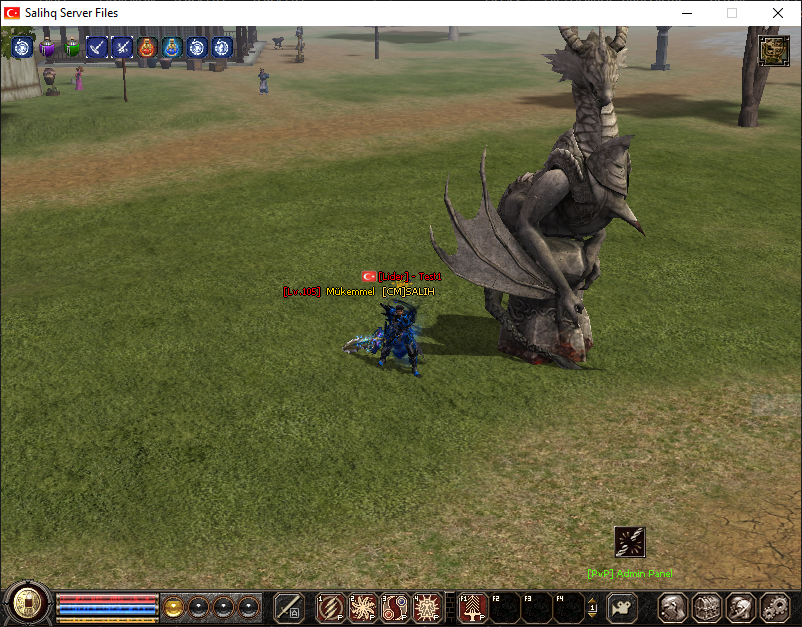
Ejderha Heykeli: Metin2 Oyununda Sanatın ve 3D Modellemenin Harmanı
Metin2 Lobby olarak, oyun dünyasında sanatsal ve teknik detayların birleştiği noktalardan biri olan Ejderha Heykeli konusunu derinlemesine incelemek istiyoruz. Bu makalede, Metin2 oyununda ejderha heykeli gibi tematik 3D modellerin nasıl oluşturulduğunu, hangi araçlarla geliştirildiğini ve oyun içinde nasıl kullanıldığını ele alacağız. Özellikle Metin2 3D modelleme, Metin2 monster model, Metin2 object ve Metin2 effect model gibi niş alanlarda uzmanlaşmış kullanıcılar için önemli bilgiler sunacağız.
Ejderha Heykeli Nedir?
Ejderha Heykeli, genellikle Metin2 gibi MMORPG oyunlarında görsel atmosferi zenginleştirmek, haritayı güzelleştirmek veya özel görevlerle entegre olmak üzere tasarlanan 3D objelerdir. Bu tür modeller, hem oyunun estetiğini artırır hem de oyunculara mistik bir atmosfer sunar. Metin2 dünyasında ejderha temalı yapılar, özellikle boss seviyesindeki yaratıklarla uyumlu olacak şekilde tasarlanır.
Ejderha Heykeli Tasarımı İçin Kullanılan Araçlar
Metin2 için 3D model oluşturmak isteyenler için en yaygın kullanılan yazılımlar 3ds Max ve Blender'dır. Bu yazılımlar sayesinde yüksek detaylı mesh yapıları oluşturulabilir. Ayrıca Metin2 GR2 ve Granny3D formatlarına uygun model çıkarımı yapabilmek için özel eklentiler kullanılır. GR2 Export ve GR2 Import işlemleri, modelin oyun içi formatlara dönüştürülmesini sağlar.
UV Mapping ve Doku Uygulamaları
Her 3D modelin kalitesi, doğru UV haritalama ve doku (texture) uygulamalarıyla belirlenir. Metin2 texture ve skin işlemleri, modelin gerçekçi görünmesi açısından kritik öneme sahiptir. Ejderha heykelinin yüzey detayları, pullar, çatlaklar gibi unsurlar, dikkatlice UV haritası çıkarılarak ve doğru şekilde dokulanarak hayata geçirilir.
Modelin Oyuna Entegrasyonu
Oluşturulan Ejderha Heykeli modeli, Metin2 model replace veya Metin2 model import işlemleriyle oyuna entegre edilebilir. Bu işlem sırasında Metin2 pack model sistemine uygun paketleme yöntemleri kullanılır. Ayrıca, EterPack veya Martysama gibi gelişmiş model paketleme araçları da tercih edilebilir. Bu sayede model, hem görsel açıdan etkileyici hem de teknik olarak sorunsuz çalışır hale gelir.
Ejderha Heykeli ile Görsel Modifikasyonlar
Geliştiriciler, Ejderha Heykeli gibi modelleri kullanarak Metin2 visual mod ve graphic mod projeleri geliştirebilirler. Bu modifikasyonlar, oyunun görsel deneyimini ciddi anlamda artırır. Örneğin, bir Metin2 dungeon model veya map object olarak yerleştirilen ejderha heykeli, harita üzerinde güçlü bir görsel odak noktası oluşturur.
Sonuç
Ejderha Heykeli, Metin2 oyununda görsel estetik ile teknik becerinin buluştuğu örneklerden biridir. Metin2 3D modelleme alanında çalışan geliştiriciler için bu tür projeler, teknik bilgiyi sanatsal yaratıcılıkla harmanlayan değerli çalışmalardır. Metin2 Lobby olarak bizler de bu alandaki tüm yaratıcı projeleri destekliyor ve kullanıcılarımızın dikkatine sunuyoruz.
Dragon Statue: The Fusion of Art and 3D Modeling in Metin2
Metin2 Lobby, as a community, aims to deeply explore the topic of Dragon Statue, one of the points where artistic and technical details merge within the game world. In this article, we will examine how thematic 3D models like the dragon statue are created in Metin2, what tools are used for their development, and how they are implemented within the game. Particularly, important information will be provided for users specialized in niche areas such as Metin2 3D modeling, Metin2 monster models, Metin2 objects, and Metin2 effect models.
What is a Dragon Statue?
A Dragon Statue is typically a 3D object designed in MMORPG games like Metin2 to enhance visual atmosphere, beautify maps, or integrate with special quests. Such models not only increase the aesthetic value of the game but also provide players with a mystical atmosphere. Within the world of Metin2, dragon-themed structures are designed to align with high-level boss creatures.
Tools Used for Creating Dragon Statue Designs
The most commonly used software for creating 3D models for Metin2 includes 3ds Max and Blender. These programs allow for the creation of highly detailed mesh structures. Additionally, specific plugins are utilized to export models compatible with Metin2 GR2 and Granny3D formats. GR2 Export and GR2 Import operations ensure that models are converted into in-game compatible formats.
UV Mapping and Texture Applications
The quality of every 3D model is determined by proper UV mapping and texture applications. Metin2 texture and skin processes are critical for achieving a realistic appearance. Surface details of the dragon statue, such as scales and cracks, are carefully mapped and textured to come alive.
Integration of the Model Into the Game
The created Dragon Statue model can be integrated into the game through Metin2 model replace or Metin2 model import operations. During this process, packaging methods compliant with the Metin2 pack model system are used. Additionally, advanced tools like EterPack or Martysama may be preferred for packaging. This ensures that the model becomes visually impressive and technically flawless.
Visual Modifications Using the Dragon Statue
Developers can create Metin2 visual mod and graphic mod projects using models like the Dragon Statue. These modifications significantly enhance the visual experience of the game. For example, placing a dragon statue as a Metin2 dungeon model or map object creates a strong visual focal point on the map.
Conclusion
A Dragon Statue is one of the examples where visual aesthetics meet technical skills in Metin2. Projects like these represent valuable works for developers working in Metin2 3D modeling that blend technical knowledge with artistic creativity. As Metin2 Lobby, we support and present all creative projects in this field to our users.
Ziyaretçiler için gizlenmiş link,görmek için üye olmalısınız!
Giriş yap veya üye ol.
Ziyaretçiler için gizlenmiş link,görmek için üye olmalısınız!
Giriş yap veya üye ol.
Ejderha Heykeli: Metin2 Oyununda Sanatın ve 3D Modellemenin Harmanı
Metin2 Lobby olarak, oyun dünyasında sanatsal ve teknik detayların birleştiği noktalardan biri olan Ejderha Heykeli konusunu derinlemesine incelemek istiyoruz. Bu makalede, Metin2 oyununda ejderha heykeli gibi tematik 3D modellerin nasıl oluşturulduğunu, hangi araçlarla geliştirildiğini ve oyun içinde nasıl kullanıldığını ele alacağız. Özellikle Metin2 3D modelleme, Metin2 monster model, Metin2 object ve Metin2 effect model gibi niş alanlarda uzmanlaşmış kullanıcılar için önemli bilgiler sunacağız.
Ejderha Heykeli Nedir?
Ejderha Heykeli, genellikle Metin2 gibi MMORPG oyunlarında görsel atmosferi zenginleştirmek, haritayı güzelleştirmek veya özel görevlerle entegre olmak üzere tasarlanan 3D objelerdir. Bu tür modeller, hem oyunun estetiğini artırır hem de oyunculara mistik bir atmosfer sunar. Metin2 dünyasında ejderha temalı yapılar, özellikle boss seviyesindeki yaratıklarla uyumlu olacak şekilde tasarlanır.
Ejderha Heykeli Tasarımı İçin Kullanılan Araçlar
Metin2 için 3D model oluşturmak isteyenler için en yaygın kullanılan yazılımlar 3ds Max ve Blender'dır. Bu yazılımlar sayesinde yüksek detaylı mesh yapıları oluşturulabilir. Ayrıca Metin2 GR2 ve Granny3D formatlarına uygun model çıkarımı yapabilmek için özel eklentiler kullanılır. GR2 Export ve GR2 Import işlemleri, modelin oyun içi formatlara dönüştürülmesini sağlar.
UV Mapping ve Doku Uygulamaları
Her 3D modelin kalitesi, doğru UV haritalama ve doku (texture) uygulamalarıyla belirlenir. Metin2 texture ve skin işlemleri, modelin gerçekçi görünmesi açısından kritik öneme sahiptir. Ejderha heykelinin yüzey detayları, pullar, çatlaklar gibi unsurlar, dikkatlice UV haritası çıkarılarak ve doğru şekilde dokulanarak hayata geçirilir.
Modelin Oyuna Entegrasyonu
Oluşturulan Ejderha Heykeli modeli, Metin2 model replace veya Metin2 model import işlemleriyle oyuna entegre edilebilir. Bu işlem sırasında Metin2 pack model sistemine uygun paketleme yöntemleri kullanılır. Ayrıca, EterPack veya Martysama gibi gelişmiş model paketleme araçları da tercih edilebilir. Bu sayede model, hem görsel açıdan etkileyici hem de teknik olarak sorunsuz çalışır hale gelir.
Ejderha Heykeli ile Görsel Modifikasyonlar
Geliştiriciler, Ejderha Heykeli gibi modelleri kullanarak Metin2 visual mod ve graphic mod projeleri geliştirebilirler. Bu modifikasyonlar, oyunun görsel deneyimini ciddi anlamda artırır. Örneğin, bir Metin2 dungeon model veya map object olarak yerleştirilen ejderha heykeli, harita üzerinde güçlü bir görsel odak noktası oluşturur.
Sonuç
Ejderha Heykeli, Metin2 oyununda görsel estetik ile teknik becerinin buluştuğu örneklerden biridir. Metin2 3D modelleme alanında çalışan geliştiriciler için bu tür projeler, teknik bilgiyi sanatsal yaratıcılıkla harmanlayan değerli çalışmalardır. Metin2 Lobby olarak bizler de bu alandaki tüm yaratıcı projeleri destekliyor ve kullanıcılarımızın dikkatine sunuyoruz.
Dragon Statue: The Fusion of Art and 3D Modeling in Metin2
Metin2 Lobby, as a community, aims to deeply explore the topic of Dragon Statue, one of the points where artistic and technical details merge within the game world. In this article, we will examine how thematic 3D models like the dragon statue are created in Metin2, what tools are used for their development, and how they are implemented within the game. Particularly, important information will be provided for users specialized in niche areas such as Metin2 3D modeling, Metin2 monster models, Metin2 objects, and Metin2 effect models.
What is a Dragon Statue?
A Dragon Statue is typically a 3D object designed in MMORPG games like Metin2 to enhance visual atmosphere, beautify maps, or integrate with special quests. Such models not only increase the aesthetic value of the game but also provide players with a mystical atmosphere. Within the world of Metin2, dragon-themed structures are designed to align with high-level boss creatures.
Tools Used for Creating Dragon Statue Designs
The most commonly used software for creating 3D models for Metin2 includes 3ds Max and Blender. These programs allow for the creation of highly detailed mesh structures. Additionally, specific plugins are utilized to export models compatible with Metin2 GR2 and Granny3D formats. GR2 Export and GR2 Import operations ensure that models are converted into in-game compatible formats.
UV Mapping and Texture Applications
The quality of every 3D model is determined by proper UV mapping and texture applications. Metin2 texture and skin processes are critical for achieving a realistic appearance. Surface details of the dragon statue, such as scales and cracks, are carefully mapped and textured to come alive.
Integration of the Model Into the Game
The created Dragon Statue model can be integrated into the game through Metin2 model replace or Metin2 model import operations. During this process, packaging methods compliant with the Metin2 pack model system are used. Additionally, advanced tools like EterPack or Martysama may be preferred for packaging. This ensures that the model becomes visually impressive and technically flawless.
Visual Modifications Using the Dragon Statue
Developers can create Metin2 visual mod and graphic mod projects using models like the Dragon Statue. These modifications significantly enhance the visual experience of the game. For example, placing a dragon statue as a Metin2 dungeon model or map object creates a strong visual focal point on the map.
Conclusion
A Dragon Statue is one of the examples where visual aesthetics meet technical skills in Metin2. Projects like these represent valuable works for developers working in Metin2 3D modeling that blend technical knowledge with artistic creativity. As Metin2 Lobby, we support and present all creative projects in this field to our users.
