

Merhabalar,
Texture yolu değiştiriciden bahsetmek istiyorum, bu program sayesinde gr2 modelinizin texture yolunu değiştirebilirsiniz.
WİN 10 SORUNSUZ ÇALIŞIYOR.
Örneğin
--------------------
Zırh.gr2
Çektiği dds'nin yolu : D:\ymir work\pc\assassin\zırh_deneme.dds
Çektiği yolu değiştirebilirsiniz.
--------------------------
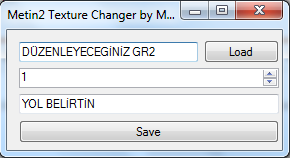
Texture yolu değiştiriciden bahsetmek istiyorum, bu program sayesinde gr2 modelinizin texture yolunu değiştirebilirsiniz.
WİN 10 SORUNSUZ ÇALIŞIYOR.
Örneğin
--------------------
Zırh.gr2
Çektiği dds'nin yolu : D:\ymir work\pc\assassin\zırh_deneme.dds
Çektiği yolu değiştirebilirsiniz.
--------------------------
--------------------------
EDIT
---------------------------
Eğer çalıştırmayı beceremez iseniz bu konuyada göz atmanızı tavsiye ederim oradakinin çalışacagına eminim.
Ziyaretçiler için gizlenmiş link,görmek için üye olmalısınız!
Giriş yap veya üye ol.
[İŞİNİZE YARAYACAK] Texture Yolu Değiştirici Nedir?
Metin2 sunucularında 3D modelleme, texture yönetimi ve özel model düzenlemeleri yaparken sıklıkla karşılaşılan bir sorun, texture dosyalarının doğru konumda bulunamamasıdır. Bu durum, modelin oyun içinde düzgün görüntülenmemesine neden olur. İşte tam bu noktada devreye Texture Yolu Değiştirici adlı araç girer. Bu araç sayesinde texture yollarını kolayca değiştirebilir, modelin doğru şekilde yüklenmesini sağlayabilirsiniz.
Texture Yolu Değiştirici nedir?
Texture Yolu Değiştirici, Metin2 üzerinde çalışan 3D modellerin texture dosyalarının yolunu hızlıca güncelleyen bir yardımcı programdır. Özellikle özel NPC, monster ya da item modelleri oluştururken kullanılan bu araç, texture'ların yanlış konumlandığı durumlarda çözüm sunar. Bu araç genellikle GR2 formatındaki modellerde texture yollarını otomatik veya manuel olarak düzenlemenizi sağlar.
Neden Texture Yolu Değiştirici Kullanmalısınız?
Metin2 3D modelleme dünyasında çalışırken, texture'lar genellikle farklı klasörlerde tutulur. Sunucu dosyalarında texture'ların bulunduğu dizinler değiştiğinde, modelin doğru görüntülenmesi için texture yollarının güncellenmesi gerekir. Elle bu işlemi yapmak zaman alıcı ve hataya açıktır. Texture Yolu Değiştirici bu süreci hızlandırır ve hatasız sonuç alınmasını sağlar. Ayrıca Blender veya 3DS Max gibi programlardan dışa aktarılan modellerde texture yollarını doğrultmak için de idealdir.
Texture Yolu Değiştirici Özellikleri
- Texture yollarını manuel olarak değiştirmeye olanak tanır.
- Otomatik tarama özelliği ile mevcut texture konumlarını tespit eder.
- GR2, Granny3D ve diğer Metin2 model formatları ile uyumlu çalışır.
- Kolay arayüzü sayesinde yeni başlayanlar için bile kullanıcı dostudur.
- Metin2 sunucularında texture konfigürasyon sorunlarını çözmek için optimize edilmiştir.
Nasıl Kullanılır?
Öncelikle Metin2Lobby üzerinden uygun Texture Yolu Değiştirici aracını indirin. Programı çalıştırdıktan sonra, texture yollarını değiştirmek istediğiniz model dosyasını (örneğin .gr2) seçin. Arayüz üzerinden eski ve yeni texture yollarını belirtin. 'Yol Güncelle' butonuna tıkladığınızda, texture yolları başarıyla değiştirilecektir. Bu işlem sonrası modeli sunucuya yüklediğinizde, texture'lar doğru şekilde görüntülenecektir.
Metin2 Model Editörü ile Entegrasyon
Bazı gelişmiş kullanıcılar, Texture Yolu Değiştiriciyi Metin2 Model Edit yazılımlarıyla birlikte kullanarak daha verimli sonuçlar elde eder. Özellikle custom model projelerinde texture yollarını önceden tanımlamak, sonradan oluşabilecek hataları önler. Bu tür projelerde UV mapping ve texture koordinatlarının doğru ayarlanması da büyük önem taşır.
Sonuç
Texture Yolu Değiştirici, Metin2 geliştiricileri ve 3D modelciler için hayati öneme sahip bir araçtır. Texture sorunları yaşayan sunucu sahipleri ve model editörleri için bu araç, verimli ve hızlı çözümler sunar. Metin2Lobby üzerinden bu tür araçlara ulaşarak Metin2 geliştirmelerinizi kolaylaştırabilirsiniz.
[USEFUL FOR YOUR BUSINESS] What is a Texture Path Changer?
In Metin2 servers, 3D modeling, texture management, and custom model modifications often face the issue of texture files not being located in the correct directories. This causes models to fail displaying properly in-game. This is where the Texture Path Changer tool comes into play. With this tool, you can easily modify texture paths and ensure models load correctly.
What is Texture Path Changer?
Texture Path Changer is a utility that allows for quick updates to the texture file paths of 3D models running on Metin2. Commonly used when creating custom NPCs, monsters, or item models, this tool solves situations where textures are misplaced. It usually works by automatically or manually updating texture paths within GR2 formatted models.
Why Should You Use Texture Path Changer?
When working in the world of Metin2 3D modeling, textures are often stored in different folders. When server file structures change, texture paths must be updated so that models display correctly. Manually editing these paths is time-consuming and error-prone. The Texture Path Changer speeds up this process and ensures accurate results. It is also ideal for correcting texture paths in models exported from programs like Blender or 3DS Max.
Features of Texture Path Changer:
- Allows manual modification of texture paths.
- Automatically scans and detects current texture locations.
- Works with Metin2 model formats such as GR2, Granny3D, and more.
- User-friendly interface suitable even for beginners.
- Optimized to solve texture configuration issues in Metin2 servers.
How to Use It?
First, download a suitable Texture Path Changer tool via Metin2Lobby. After launching the program, select the model file (e.g., .gr2) whose texture paths you wish to modify. Indicate the old and new texture paths through the interface. Upon clicking 'Update Path', the texture paths will be successfully changed. After this process, the textures will display correctly when the model is loaded onto the server.
Integration with Metin2 Model Editor:
Some advanced users combine the Texture Path Changer with Metin2 Model Edit software to achieve more efficient results. In custom model projects, pre-defining texture paths prevents potential errors later on. Proper UV mapping and texture coordinate adjustments are also crucial in such projects.
Conclusion:
Texture Path Changer is a vital tool for Metin2 developers and 3D modelers. For server owners and model editors facing texture-related problems, this tool provides efficient and fast solutions. Visit Metin2Lobby to access such tools and simplify your Metin2 development efforts.
