

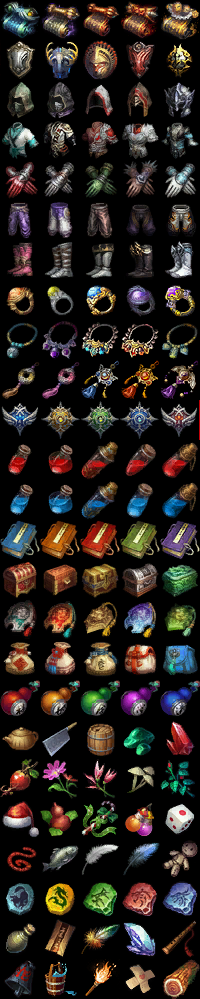
İçerisinde her tür icon bulunmaktadır.
Ziyaretçiler için gizlenmiş link,görmek için üye olmalısınız!
Giriş yap veya üye ol.
Ziyaretçiler için gizlenmiş link,görmek için üye olmalısınız!
Giriş yap veya üye ol.
Murat K - İcon Seti: Metin2 İstemcilerde Görsel Zenginlik ve Kişiselleştirme
Murat K - İcon Seti, Metin2 topluluğu arasında özellikle özel istemciler ve PVP paketleri geliştiren kişiler tarafından oldukça takdir edilen bir görsel kaynak kümesidir. Bu ikon seti, sadece estetik bir güncelleme değil; aynı zamanda oyuncu deneyimini derinleştiren, arayüzü daha sezgisel hale getiren ve teknik açıdan optimize edilmiş bir içeriktir. Özellikle Metin2Lobby gibi platformlarda paylaşılan özel Metin2 istemcilerine entegre edilen bu set, kullanıcıların oyun içi arayüzlerini daha kişisel ve işlevsel hale getirmesine olanak tanır.
Dikkat: Bu ikon seti, yalnızca uyumlu Metin2 istemcileriyle çalışmaktadır. Eski veya standart sürümlerde görüntüleme sorunları yaşanabilir. Kurulum öncesinde istemcinizin güncel yamalı ve editlenebilir yapıda olduğundan emin olun.
Murat K tarafından tasarlanan bu ikon seti, yüksek çözünürlüklü PNG formatında sunulmakta ve hem açık hem koyu temalı arayüzlerle uyumludur. Set içeriğinde; yetenek simgeleri, eşya ikonları, harita işaretleyicileri, NPC etkileşim butonları ve PVP modu için özel tasarlanmış savaş arayüzü elementleri bulunmaktadır. Bu detaylı yapı, özellikle Metin2 PVP client paketleri geliştiricileri için büyük kolaylık sağlar.
Nasıl Kullanılır?
Murat K - İcon Seti’ni kullanmak için öncelikle Metin2Lobby üzerinden indirme bağlantısına ulaşmanız gerekir. İndirdiğiniz ZIP dosyasını çıkarttıktan sonra, içindeki ‘texture’ ve ‘interface’ klasörlerini Metin2 istemcinizin ilgili dizinlerine kopyalamanız yeterlidir. Bazı durumlarda client yama veya patch işlemi gerekebilir; bu durumda forumumuzdaki rehberleri incelemeniz önerilir.
Neden Murat K İcon Seti?
Birçok Metin2 custom client geliştiricisi, standart ikonların sınırlılıklarını aşmak için bu seti tercih eder. Çünkü:
- Yüksek kaliteli vektörel tasarımlar ile her çözünürlükte netlik sağlar,
- Türk Metin2 topluluğuna özel uyarlanmış içerikler içerir (örneğin yerel sunucu etkinlikleri için özel ikonlar),
- Kolay entegrasyon ile hızlı kurulum imkanı sunar,
- Açık kaynaklı yapısı sayesinde istenirse düzenlenebilir ve kişiselleştirilebilir.
Görsel ve Video Rehberler
Aşağıda Murat K - İcon Seti’nin nasıl göründüğüne dair örnekler ve kurulum videolarına ulaşabilirsiniz:
 Kurulum Videosu ve Ekran Görüntüleri
 Galeri: İkon Seti Örnekleri
Sonuç: Eğer Metin2 client edit, Metin2 pack aç veya Metin2 özel client geliştirme yolculuğunuzda görsel kaliteyi ön planda tutuyorsanız, Murat K - İcon Seti sizin için vazgeçilmez bir kaynaktır. Topluluk tarafından test edilmiş, optimize edilmiş ve sürekli güncellenen bu set, hem yeni başlayanlar hem de deneyimli editörler için ideal çözümdür.
Daha fazla Metin2 client dosyaları, Metin2 pack indir ve Metin2 client fix içerikleri için Metin2Lobby’ye göz atmayı unutmayın!
Murat K - Icon Set: Visual Enrichment and Customization for Metin2 Clients
Murat K - Icon Set is a highly appreciated visual resource package within the Metin2 community, especially among developers of custom clients and PVP packs. This icon set is not merely an aesthetic upgrade; it also enhances player experience by making interfaces more intuitive and is technically optimized. Integrated into custom Metin2 clients shared on platforms like Metin2Lobby, this set allows users to personalize and functionalize their in-game interfaces.
Warning: This icon set only works with compatible Metin2 clients. Display issues may occur on older or standard versions. Ensure your client is patched and has an editable structure before installation.
Designed by Murat K, this icon set is delivered in high-resolution PNG format and is compatible with both light and dark-themed interfaces. The package includes skill icons, item icons, map markers, NPC interaction buttons, and specially designed combat UI elements for PVP modes. This detailed structure provides significant convenience, especially for developers of Metin2 PVP client packs.
How to Use?
To use the Murat K - Icon Set, you must first access the download link via Metin2Lobby. After downloading the ZIP file, extract it and copy the 'texture' and 'interface' folders into the corresponding directories of your Metin2 client. In some cases, a client patch or update may be required; in such cases, we recommend reviewing our forum guides.
Why Choose Murat K Icon Set?
Many Metin2 custom client developers prefer this set to overcome the limitations of default icons. Because it:
- Ensures clarity at any resolution with high-quality vector-based designs,
- Contains content adapted specifically for the Turkish Metin2 community (e.g., special icons for local server events),
- Offers easy integration for quick setup,
- Allows editing and personalization thanks to its open-source structure.
Visual and Video Guides
Below you can find examples of how the Murat K - Icon Set looks and access installation videos:
Installation Video and Screenshots Gallery: Icon Set SamplesConclusion: If you prioritize visual quality in your journey of Metin2 client editing, Metin2 pack extraction, or custom Metin2 client development, the Murat K - Icon Set is an indispensable resource. Tested, optimized, and continuously updated by the community, this set is the ideal solution for both beginners and experienced editors.
Don’t forget to check out Metin2Lobby for more Metin2 client files, Metin2 pack downloads, and Metin2 client fixes!
