

Merhaba Arkadaşlar Bu Konuda Sizlere Online Oyuncu Minimap Altı
ndaki Sistemin Oyun Seçeneklerine Göster/Gizle Sistemini Anlatacağım.
Sistem:
Görüntü
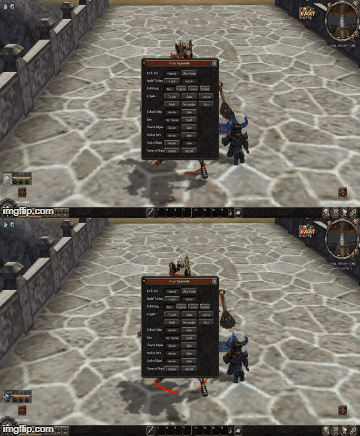
ndaki Sistemin Oyun Seçeneklerine Göster/Gizle Sistemini Anlatacağım.
Sistem:
Ziyaretçiler için gizlenmiş link,görmek için üye olmalısınız!
Giriş yap veya üye ol.
Ziyaretçiler için gizlenmiş link,görmek için üye olmalısınız!
Giriş yap veya üye ol.
(Tab Hatasi Olursa Kodlari Burdan Alin)Görüntü
Constinfo Açilir Eklenir Müsait Biyere
Kod:
ONLINE_BILGISI = 1uiGameoption.py Açilir. importlar arasina eklenir
Kod:
import backgrounduiGameOption.Py İçerisinde Arat:self.RefreshShowSalesText()
Kod:
self.RefreshOnlineOyuncuSayaci()uiGameoption.py içerisinde
Arat:self.showsalesTextButtonList = [*]
Kod:
self.OnlineOyuncuSayaci = [*]uiGameoption.py içerisinde
Arat:self.showsalesTextButtonList.append(GetObject("salestext_off_button"))
Kod:
self.OnlineOyuncuSayaci.append(GetObject("online_oyuncu_goster")) self.OnlineOyuncuSayaci.append(GetObject("online_oyuncu_gizle"))uiGameoption.py içerisinde
Arat:self.showsalesTextButtonList[1].SAFE_SetEvent(self.__OnClickSalesTextOffButton)
Kod:
self.OnlineOyuncuSayaci[0].SAFE_SetEvent(self.__OnlineOyuncuGoster) self.OnlineOyuncuSayaci[1].SAFE_SetEvent(self.__OnlineOyuncuGizle)uiGameoption.py içerisinde
Arat:def __CheckPvPProtectedLevelPlayer(self): üstüne ekle
Kod:
def __OnlineOyuncuGoster(self): constInfo.ONLINE_BILGISI = 1 # chat.AppendChat(chat.CHAT_TYPE_INFO, localeInfo.ONLINE_BILGISI_GOSTERILIYOR) self.RefreshOnlineOyuncuSayaci() def __OnlineOyuncuGizle(self): constInfo.ONLINE_BILGISI = 0 # chat.AppendChat(chat.CHAT_TYPE_INFO, localeInfo.ONLINE_BILGISI_GIZLENIYOR) self.RefreshOnlineOyuncuSayaci()Oyun Seçeneklerinde Online Oyuncu Göster/Gizle Özelliği Nedir?
Metin2 Lobby üzerinden sunuculara bağlanan oyuncuların daha iyi bir deneyim yaşaması için bazı gelişmiş ayarlar sunulmaktadır. Bunlardan birisi de Oyun Seçeneklerinde Online Oyuncu Sayısını Göster/Gizle seçeneğidir. Bu özellik sayesinde oyuncular, sunucudaki aktif kişi sayısını istedikleri zaman görebilir veya gizleyebilirler. Özellikle özel sunucularda (private server) bu tür özellikler, kullanıcıların deneyimini artırıcı unsurlardan biridir.
Neden Online Oyuncu Sayısı Gösterilsin veya Gizlensin?
Sunucu sahipleri, oyuncu yoğunluğunu kontrol altında tutmak ve oyun dengelerini yönetmek adına bu özelliği özellikle önemser. Örneğin, yüksek yoğunlukta oyun akışı yavaşlayabilir veya PvP savaşları daha kaotik hale gelebilir. Bu nedenle bazı oyuncular yoğunluğu görmek isteyebilirken, bazıları da oyun içi deneyimlerini daha rahat yaşamak adına bu sayıyı gizlemeyi tercih eder.
Metin2 özel sunucularında, bu tür ayarlar genellikle client-side olarak düzenlenir. Yani oyuncu kendi arayüzünü değiştirerek bu bilgiyi açıp kapatabilir. Ancak bazı gelişmiş sistemlerde bu işlem server-side olarak da yapılabilmektedir. Bu durumda sunucu, oyuncuya aktif kişi sayısının gösterilip gösterilmeyeceğini belirler.
Gelişmiş Ayarlar ve Sunucu Geliştirme
Eğer bir Metin2 özel sunucu geliştiriciseniz, oyuncu sayısını gösterme/gizleme özelliğini hem client tarafında hem de server tarafında kontrol etmeniz mümkündür. Client tarafında bu işlem genellikle uiscript dosyalarında yapılır. Python GUI kullanılarak oluşturulan arayüzlerde, bu tür ayarlar kolayca entegre edilebilir. Py Root yapısı üzerinden bu değişiklikler yapılabilir.
Server tarafında ise C++ source üzerinde bu verinin gönderimi kontrol edilebilir. Game server programming kapsamında, oyuncu sayısının ne zaman ve nasıl gösterileceği ayarlanabilir. Bu işlem, DB core ile de entegre edildiğinde, daha gelişmiş sistemler oluşturulabilir.
Martysama ve Metin2 Development Araçları
Metin2 development sürecinde kullanılan bazı araçlar, bu gibi ayarları daha kolay yapmanıza olanak tanır. Martysama gibi sistemler üzerinden, hem client hem de server tarafında yapılan değişiklikler test edilebilir. Ayrıca, pack dosyaları ile bu tür ayarlar sunucuya kolayca entegre edilebilir.
Sonuç
Online oyuncu sayısını gösterme/gizleme seçeneği, kullanıcı deneyimini artırmak için oldukça faydalı bir özelliktir. Hem geliştiriciler hem de oyuncular için esneklik sağlar. Metin2 Lobby platformu, bu tür gelişmiş ayarların kolayca yapılandırılabileceği bir ortam sunar. Oyun içindeki her detay, oyuncuların oyunu daha keyifli hale getirmesi için tasarlanmıştır.
What Is the Show/Hide Online Players Feature in Game Settings?
Metin2 Lobby provides advanced settings for players connecting to servers to enhance their gaming experience. One such feature is the Show/Hide Online Player Count option in game settings. This allows players to view or hide the active player count on the server whenever they want. Particularly in private servers, such features are among the elements that enhance user experience.
Why Should the Online Player Count Be Shown or Hidden?
Server owners value this feature as it helps control player density and manage game balance. For instance, high density can slow down gameplay or make PvP battles more chaotic. Therefore, some players may prefer to see the number of people online, while others might choose to hide it for a smoother and more relaxed in-game experience.
In Metin2 private servers, these kinds of settings are usually adjusted on the client-side. In other words, players can change their interface to show or hide this information. However, in some advanced systems, this process can also be handled on the server-side, where the server determines whether the active player count is shown to the user.
Advanced Settings and Server Development
If you are a Metin2 private server developer, you can control the show/hide player count feature both on the client-side and server-side. On the client-side, this is generally done within uiscript files. Such settings can easily be integrated into interfaces built with Python GUI. Modifications can be made via the Py Root structure.
On the server-side, the transmission of this data can be controlled through C++ source. Within the scope of game server programming, the timing and method of displaying the player count can be configured. When integrated with DB core, more advanced systems can be developed.
Martysama and Metin2 Development Tools
During Metin2 development, certain tools enable easier implementation of such settings. Systems like Martysama allow testing of modifications on both the client and server sides. Additionally, such settings can be easily integrated into the server using pack files.
Conclusion
The option to show or hide the online player count is a very useful feature to enhance user experience. It offers flexibility for both developers and players. The Metin2 Lobby platform provides an environment where such advanced settings can be configured easily. Every detail within the game is designed to make the gaming experience more enjoyable for players.

