

root uitaskbar.py açılır.
toggleButtonDict[TaskBar.BUTTON_CHAT]=self.GetChild("ChatButton") aratılır altına:
eklenir.

toggleButtonDict[TaskBar.BUTTON_CHAT]=self.GetChild("ChatButton") aratılır altına:
Kod:
toggleButtonDict[TaskBar.BUTTON_HORSEQUICK]=self.GetChild("button_horse")eklenir.
BUTTON_CHAT = 4 aratılır altına:
Kod:
BUTTON_HORSEQUICK = 5eklenir.

root interfacemodule.py açılır.
self.wndTaskBar.SetToggleButtonEvent(uiTaskBar.TaskBar.BUTTON_CHAT, ui.__mem_func__(self.ToggleChat)) aratılır altına:
Kod:
self.wndTaskBar.SetToggleButtonEvent(uiTaskBar.TaskBar.BUTTON_HORSEQUICK, ui.__mem_func__(self.horse_button))eklenir.

def __IsChatOpen(self):
return TRUE
aratılır altına:
Kod:
def horse_button(self): import constInfo qid = constInfo.LOAD_QUEST_HORSE_BUTTON event.QuestButtonClick(qid)eklenir.

root constInfo.py açılır
PVPMODE_PROTECTED_LEVEL = aratılır altına:
Kod:
LOAD_QUEST_HORSE_BUTTON = 0eklenir.

root game.py açılır
"mall" : self.__InGameShop_Show, aratılır altına:
Kod:
"horse_button" : self.__Horse_button,eklenir.

game.py en altına :
Kod:
#DG TaskbarButon def __Horse_button(self, qid): constInfo.LOAD_QUEST_HORSE_BUTTON = int(qid) #DG TaskbarButoneklenir.
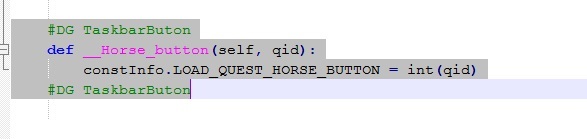
locale de yada tr taskbar.py açılır
"down_image" : ROOT + "TaskBar/Inventory_Button_03.sub",
},
aratılır altına:
Kod:
{ "name" : "button_horse", "type" : "button", "x" : SCREEN_WIDTH - 178, "y" : 3 + Y_ADD_POSITION, "tooltip_text" : "At Cagirma", "default_image" : "d:/ymir work/ui/demirgamebuton1.tga", "over_image" : "d:/ymir work/ui/demirgamebuton2.tga", "down_image" : "d:/ymir work/ui/demirgamebuton1.tga", },eklenir.
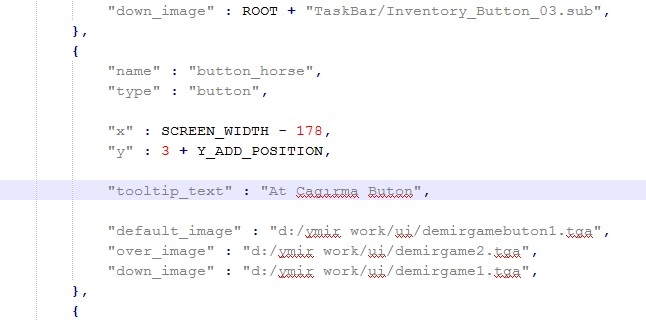
ymir work klasörünüde rootun içine ataılım ve questi okutalım reboot atalım.
Oyun İçinden Görüntü:
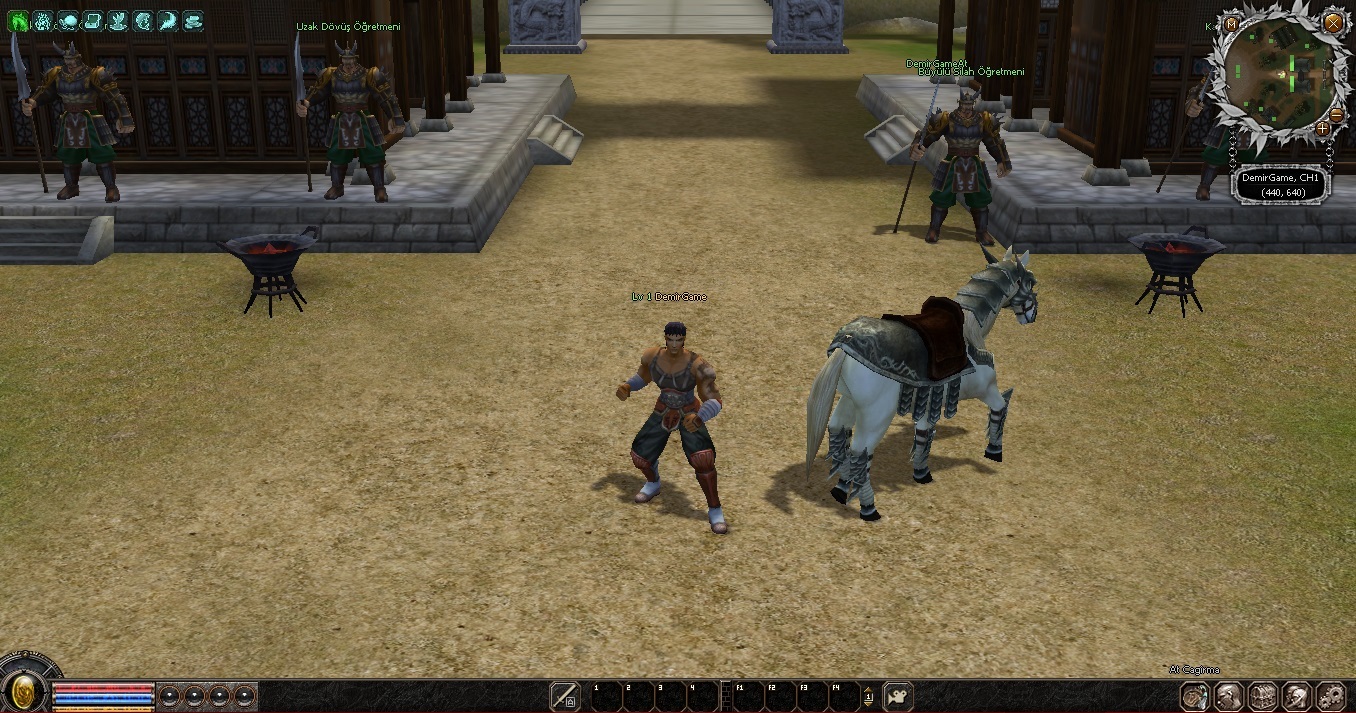
Ziyaretçiler için gizlenmiş link,görmek için üye olmalısınız!
Giriş yap veya üye ol.

Ziyaretçiler için gizlenmiş link,görmek için üye olmalısınız!
Giriş yap veya üye ol.
Metin2 Lobby'da Python ile TaskBar At Çağırma Butonu Oluşturma Rehberi
Metin2 özel sunucularında geliştirme yaparken, oyuncuların daha hızlı ve kolay bir şekilde belirli görevleri gerçekleştirmesini sağlayan butonlar tasarlamak oldukça önemlidir. Özellikle Python GUI sistemleri kullanarak, kullanıcı dostu arayüzler oluşturmak mümkündür. Bu yazıda, Python tabanlı bir GUI üzerinden TaskBar At komutunu çağıran bir buton nasıl yapılır, onu inceleyeceğiz. Bu işlem genellikle Martysama veya diğer C++ kaynak kodlarda bulunan sistemlere entegre edilebilir.
TaskBar At Komutu Nedir?
TaskBar At komutu, Metin2 özel sunucularında genellikle bir karaktere özel görevler atamak veya bir sistem başlatmak için kullanılır. Bu komut sayesinde belirli eylemler doğrudan TaskBar üzerinden tetiklenebilir. Python GUI ile bir buton oluşturulduğunda, bu butonun tıklanması ile TaskBar At komutu çalıştırılabilir.
Python GUI Kullanımı ve Uiscript Entegrasyonu
Python GUI sistemleri, özellikle Py Root ve Pack dosyalarıyla birlikte kullanıldığında, Metin2 özel sunucularında güçlü arayüzler oluşturulmasına olanak tanır. UIscript dosyaları sayesinde butonlar, pencereler ve diğer arayüz elemanları tanımlanabilir. TaskBar At çağrısı bu sistem üzerinden yapılabilir.
TaskBar At Çağırma Butonu Oluşturma Adımları
1. Öncelikle Python GUI kütüphanesi kullanarak bir buton nesnesi oluşturuyoruz.
2. Bu butonun tıklanma olayına bir fonksiyon atıyoruz.
3. Fonksiyon içinde TaskBar At komutunu çağırıyoruz.
4. Komutun doğru çalışması için gerekli parametreleri belirtiyoruz.
5. Oluşturulan butonu UIscript dosyasına entegre ediyoruz.
Örnek Kod Yapısı
Kod:
[BR][/BR]def taskbar_at_call():[BR][/BR] import os[BR][/BR] os.system('taskbar_at_command') # Burada özel bir komut çağrısı yapılabilir[BR][/BR][BR][/BR]button = Button(text='TaskBar At', command=taskbar_at_call)[BR][/BR]button.pack()[BR][/BR]Py Root ve Pack Dosyaları ile Entegrasyon
Py Root dosyalarında tanımlanan Python betikleri, Pack dosyaları ile birlikte sunucuya aktarılır. Bu sayede buton gibi arayüz öğeleri oyuncular tarafından kullanılabilir. Pack dosyası içinde UIscript ile tanımlanan buton, TaskBar At komutunu çağırmak üzere yapılandırılır.
C++ ve Python Arasında Veri Aktarımı
Metin2 özel sunucularında C++ tabanlı sistemlerle Python GUI arasında veri aktarımı oldukça yaygındır. TaskBar At komutunun çalışması için C++ tarafında tanımlanmış bir fonksiyona Python üzerinden erişim sağlanabilir. Bu tür entegrasyonlar, özellikle DB Core ve Game Core sistemlerinde sıklıkla kullanılır.
Martysama ve Diğer Geliştirme Araçları
Martysama gibi sistemler, Metin2 geliştiricilerinin GUI ve sistem geliştirmede kullandığı güçlü araçlardır. Python ile TaskBar At komutunu çağıran butonun entegrasyonu, bu tür sistemlerle daha da kolaylaştırılabilir. Ayrıca, Auth ve Game Server Programming süreçlerinde bu tür entegrasyonlar büyük kolaylık sağlar.
Sonuç
Python GUI kullanarak TaskBar At komutunu çağıran bir buton oluşturmak, Metin2 özel sunucularında kullanıcı deneyimini artırır. Bu tür butonlar, hem geliştiriciler hem de oyuncular için işlevsel çözümler sunar. Py Root, Pack, UIscript gibi yapılarla entegre bir şekilde çalışarak güçlü sistemler oluşturulabilir.
Creating a TaskBar At Call Button with Python on Metin2 Lobby
When developing Metin2 private servers, creating buttons that allow players to quickly and easily perform certain tasks is very important. By using Python GUI systems, it is possible to create user-friendly interfaces. In this article, we will examine how to create a button that calls the TaskBar At command through a Python-based GUI. This operation can typically be integrated into systems found in MartySama or other C++ source codes.
What is the TaskBar At Command?
The TaskBar At command is generally used in Metin2 private servers to assign special tasks to a character or to launch a specific system. With this command, certain actions can be triggered directly from the TaskBar. When a button is created using Python GUI, clicking this button can execute the TaskBar At command.
Using Python GUI and Integrating with UIscript
Python GUI systems, especially when combined with Py Root and Pack files, enable the creation of powerful interfaces for Metin2 private servers. UIscript files allow defining buttons, windows, and other interface elements. The TaskBar At call can be executed through this system.
Steps to Create a TaskBar At Calling Button
1. First, create a button object using the Python GUI library.
2. Attach a function to the click event of this button.
3. Call the TaskBar At command inside the function.
4. Specify the necessary parameters for the command to run correctly.
5. Integrate the created button into the UIscript file.
Sample Code Structure
Kod:
[BR][/BR]def taskbar_at_call():[BR][/BR] import os[BR][/BR] os.system('taskbar_at_command') # A custom command call can be made here[BR][/BR][BR][/BR]button = Button(text='TaskBar At', command=taskbar_at_call)[BR][/BR]button.pack()[BR][/BR]Integration with Py Root and Pack Files
Python scripts defined in Py Root files are transferred to the server together with Pack files. This allows interface elements such as buttons to be usable by players. The button defined in the UIscript within the Pack file is configured to call the TaskBar At command.
Data Transfer Between C++ and Python
In Metin2 private servers, data transfer between C++-based systems and Python GUI is quite common. Access to a function defined on the C++ side can be achieved from Python to execute the TaskBar At command. Such integrations are frequently used in DB Core and Game Core systems.
MartySama and Other Development Tools
Systems like MartySama are powerful tools used by Metin2 developers for GUI and system development. Integrating a button that calls the TaskBar At command via Python can be further simplified using these types of systems. Additionally, such integrations provide great convenience during Auth and Game Server Programming processes.
Conclusion
Creating a button that calls the TaskBar At command using Python GUI enhances the user experience in Metin2 private servers. Such buttons provide functional solutions for both developers and players. Working in an integrated manner with structures such as Py Root, Pack, and UIscript allows for the creation of robust systems.
