

Merhaba,
Yıllardır böyle saçma bir olay neden var diye merak ettiğim, eminim bazılarınızın da merak ettiği bizler için küçük ama kainat için de küçük bir düzenleme paylaşacağım.
Yabancı bir forumda gezerken gördüm, benim gibi bu tarz önemsenmeyen olayları ciddi kafasına takan, her şey kusursuz ve mükemmel olsun diye düşünenlerin işine yarayacaktır eminim.
Ha bu arada, Owsap paylaşmış başka bir forumda teşekkür ederim kendisine.
Yabancı platformlarda satış yapan arkadaşlar, kendi kalitelerini sunmak için topluluğa güzel içerikler paylaşıyorlar. Umarım bizimkiler de biraz faydalı olmaya çalışarak bu bölümü daha doğru ve güzel içeriklerle doldurabilirler. Malum eventlflaglar ile GM kod kapatma gibi şeyler çok üzücü bölüm kalitesi için.
Düzelteceğimiz sorun tam olarak şu ;
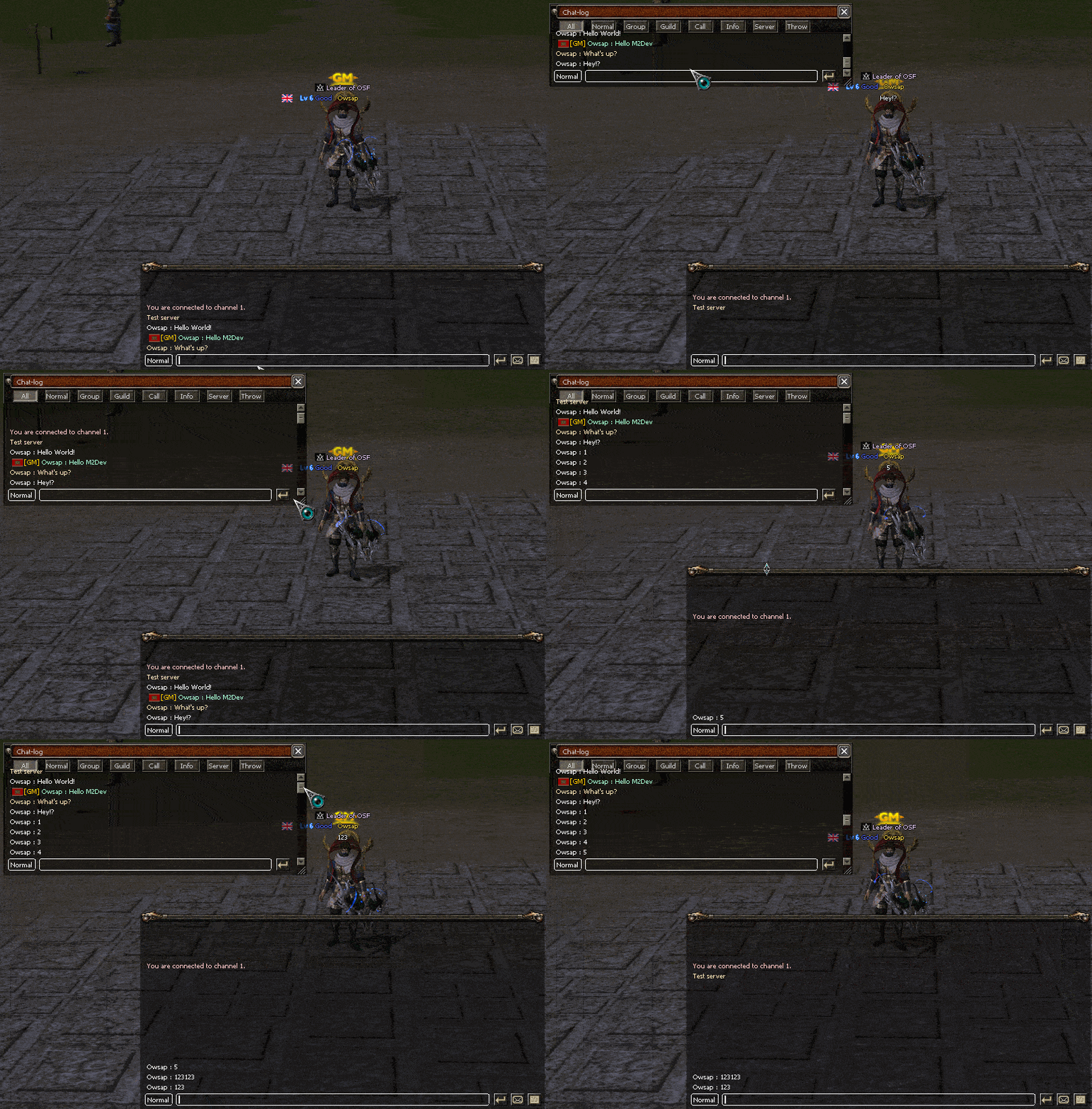
Ben görsel ile anlamadım derseniz L tuşuna basıp chat-log açtığınızda normal sohbetin mala bağladığını görebilirsiniz.
Client Source/UserInterface/Locale_Inc.h aç ve aşağıdaki kodu müsait bir yere dahil et
Client Source/UserInterface/PythonChat.cpp aç ve aşağıdaki düzenlemeleri yap
Client Source/UserInterface/PythonChat.h aç ve aşağıdaki düzenlemeleri yap
Son olarak bu işlemleri yaparken aşağıdakini arkaplanda aktif etmeniz şiddetle önerilir.
Hepinize bir dönem kumar borcu olduğu için kıbrıs otellerinde ücretsiz konser vermek zorunda kalan Serdar Ortaç'ın şansını diliyorum.
İyi forumlar.
Sohbet Penceresi Log Fix Nedir?
Metin2 özel sunucularında geliştirme yaparken birçok geliştirici, sohbet penceresinde görünen logların sistemsel hatalar veya eksiklikler nedeniyle düzgün çalışmadığını fark edebilir. Bu durum, oyuncuların oyun içi mesajları takip edememesine veya geliştiricilerin debug süreçlerini zorlaştırmasına neden olabilir. Bu yazıda, 'Sohbet Penceresi Log Fix' adı verilen sistemi nasıl doğru şekilde entegre edebileceğinizi ve bu sistemin Metin2 özel sunucu geliştirme sürecinde ne kadar kritik bir rol oynadığını ele alacağız.
Neden Sohbet Penceresi Log Fix Gereklidir?
Metin2 özel sunucularında, oyuncuların gönderdiği mesajlar, sistem bildirimleri, hata çıktıları gibi içerikler genellikle sohbet penceresinde görüntülenir. Ancak bazı durumlarda, bu loglar eksik, gecikmeli veya tamamen görünmeyebilir. Bu sorun, genellikle client-side veya server-side yapılandırmaların yetersiz kalmasından kaynaklanır. Bu noktada 'Log Fix' olarak bilinen düzeltmeler, hem oyun deneyimini artırmak hem de geliştirme sürecinde kolaylık sağlamak için önemlidir.
Log Fix Uygulamasının C++ Tarafında Yapısı
Metin2 özel sunucu geliştirme sürecinde, log sistemi genellikle C++ tabanlıdır. Game server üzerinde çalışan sistem, belirli olaylarda loglama işlemleri gerçekleştirir. Bu işlemler, client tarafında doğru şekilde yansıtılmadığında kullanıcıya eksik bilgi aktarılır. Log fix, bu eksikliği gidermek amacıyla geliştiricilerin client-side'da değişiklikler yapmasını gerektirir. Bu değişiklikler genellikle UIScript ve PY Root dosyalarında yapılır. Örneğin, chat_log.py dosyası üzerinde yapılan değişiklikler, mesajların daha hızlı ve doğru şekilde sohbet ekranına yansıtılmasını sağlar.
Python GUI ve UIScript Entegrasyonu
Metin2 client tarafında log düzeltmeleri genellikle Python GUI arayüzleri üzerinden yönetilir. Py Root klasörlerinde yer alan script dosyaları, kullanıcı arayüzüne doğrudan etki eder. Sohbet penceresi log fix işlemleri sırasında, UIChat.py gibi dosyalar üzerinde değişiklikler yapılması gerekir. Bu değişiklikler, mesajların sıralamasını, görüntülenme süresini ve hata türlerine göre filtrelenmesini sağlar. Böylece geliştiriciler, oyun içinde yaşanan problemleri daha hızlı teşhis edebilir.
Martysama ve Diğer Geliştirici Kaynakları
Metin2 geliştirme sürecinde, birçok geliştirici Martysama gibi tanınmış kaynaklardan destek alır. Bu tür kaynaklar, log fix gibi sistemlerin doğru entegrasyonu için örnek kodlar ve açıklamalar sunar. Metin2lobby.com olarak biz de, geliştiricilerin bu tür sistemleri daha kolay uygulayabilmesi için sürekli güncel kaynaklar sunuyoruz. Sohbet penceresi log düzeltmesi de bu kaynaklardan biridir.
DB ve Auth Sunucularıyla Entegrasyon
Log sistemlerinin doğru çalışması, sadece client tarafında değil, aynı zamanda DB (database) ve Auth (kimlik doğrulama) sunucularıyla olan uyumuna da bağlıdır. Oyuncu mesajları, sunucu olayları ve hata raporları doğru şekilde veritabanına yazıldığında, client tarafında daha güvenilir loglama yapılabilir. Bu nedenle, log fix uygulamaları sırasında DB ve Auth yapılandırmaları da göz önünde bulundurulmalıdır.
Sistem Performansı ve Debug Süreçleri
Log fix, sadece kullanıcı deneyimi için değil, aynı zamanda geliştirme sürecinde debug işlemlerini kolaylaştırmak için de önemlidir. Doğru şekilde yapılandırılmış bir log sistemi sayesinde, sunucuda meydana gelen hatalar, olaylar ve kullanıcı etkileşimleri anlık olarak takip edilebilir. Bu, hem sistem performansını artırır hem de geliştiricilerin daha verimli çalışmasını sağlar.
Sonuç
Metin2 özel sunucu geliştirme sürecinde sohbet penceresi log fix, hem oyun deneyimini artıran hem de debug süreçlerini kolaylaştıran önemli bir sistemdir. C++ ve Python tabanlı yapılar üzerinden entegre edilebilen bu sistem, doğru şekilde uygulandığında hem geliştiriciler hem de oyuncular için faydalı sonuçlar doğurur. Metin2lobby.com olarak, bu tür gelişmiş sistemlerin doğru entegrasyonu için gerekli tüm kaynakları sunmaya devam ediyoruz.
What is Chat Window Log Fix?
While developing Metin2 private servers, many developers may notice that logs displayed in the chat window do not function properly due to system errors or deficiencies. This situation can prevent players from following in-game messages or make debugging processes harder for developers. In this article, we will discuss how to correctly integrate the system known as 'Chat Window Log Fix' and highlight its critical role in the process of Metin2 private server development.
Why is Chat Window Log Fix Necessary?
In Metin2 private servers, player-sent messages, system notifications, error outputs, etc., are usually displayed in the chat window. However, in certain cases, these logs may appear incomplete, delayed, or even completely invisible. This issue typically arises from insufficient client-side or server-side configurations. At this point, fixes known as 'Log Fix' are essential to both enhance the gaming experience and simplify the development process.
Structure of Log Fix on the C++ Side
In the process of Metin2 private server development, the logging system is often based on C++. The system running on the game server performs logging operations during specific events. When these operations are not properly reflected on the client side, users receive incomplete information. The Log Fix aims to resolve this deficiency by requiring developers to make changes on the client-side. These changes are usually done within UIScript and PY Root files. For example, modifications made to the chat_log.py file allow messages to be displayed more quickly and accurately in the chat window.
Python GUI and UIScript Integration
In the Metin2 client, log corrections are usually managed through Python GUI interfaces. Script files located in Py Root folders directly affect the user interface. During chat window log fix procedures, changes must be made to files like UIChat.py. These modifications control the order of messages, their display duration, and filtering according to error types. Thus, developers can diagnose problems occurring within the game more quickly.
Martysama and Other Developer Resources
Throughout the Metin2 development process, many developers rely on well-known sources such as Martysama. Such resources provide example codes and explanations for the correct integration of systems like log fix. As Metin2lobby.com, we continuously offer updated resources to help developers implement these kinds of systems more easily. Chat window log fix is one of those resources.
Integration with DB and Auth Servers
The correct operation of log systems depends not only on the client side but also on compatibility with DB (database) and Auth (authentication) servers. When player messages, server events, and error reports are correctly written into the database, more reliable logging can occur on the client side. Therefore, DB and Auth configurations should also be considered during log fix implementations.
System Performance and Debugging Processes
Log fix is important not only for enhancing the user experience but also for facilitating debugging processes during development. Thanks to a properly configured log system, errors occurring on the server, events, and player interactions can be tracked in real-time. This improves both system performance and allows developers to work more efficiently.
Conclusion
In the process of Metin2 private server development, chat window log fix is an important system that enhances the gaming experience and simplifies debugging processes. Integrated via C++ and Python-based structures, this system yields beneficial outcomes for both developers and players when applied correctly. As Metin2lobby.com, we continue to provide all necessary resources for the correct integration of such advanced systems.
Yıllardır böyle saçma bir olay neden var diye merak ettiğim, eminim bazılarınızın da merak ettiği bizler için küçük ama kainat için de küçük bir düzenleme paylaşacağım.
Yabancı bir forumda gezerken gördüm, benim gibi bu tarz önemsenmeyen olayları ciddi kafasına takan, her şey kusursuz ve mükemmel olsun diye düşünenlerin işine yarayacaktır eminim.
Ha bu arada, Owsap paylaşmış başka bir forumda teşekkür ederim kendisine.
Yabancı platformlarda satış yapan arkadaşlar, kendi kalitelerini sunmak için topluluğa güzel içerikler paylaşıyorlar. Umarım bizimkiler de biraz faydalı olmaya çalışarak bu bölümü daha doğru ve güzel içeriklerle doldurabilirler. Malum eventlflaglar ile GM kod kapatma gibi şeyler çok üzücü bölüm kalitesi için.
Düzelteceğimiz sorun tam olarak şu ;
Ben görsel ile anlamadım derseniz L tuşuna basıp chat-log açtığınızda normal sohbetin mala bağladığını görebilirsiniz.
Client Source/UserInterface/Locale_Inc.h aç ve aşağıdaki kodu müsait bir yere dahil et
Kod:
#define /* @author: Owsap */ ENABLE_CHAT_LOG_FIX // Chat-log window fixClient Source/UserInterface/PythonChat.cpp aç ve aşağıdaki düzenlemeleri yap
Kod:
/// 1. // Şunun içerisinden @ void CPythonChat::UpdateViewMode aşağıdaki alanı bul TChatLineList* pLineList = &(pChatSet->m_ShowingChatLineList); // Bununla Değiştir #if defined(ENABLE_CHAT_LOG_FIX) TChatLineList* pLineList = &(dwID == CHAT_SET_LOG_WINDOW ? pChatSet->m_ShowingChatLogLineList : pChatSet->m_ShowingChatLineList); #else TChatLineList* pLineList = &(pChatSet->m_ShowingChatLineList); #endif /// 2. // Şunun içerisinden @ void CPythonChat::UpdateEditMode aşağıdaki alanı bul TChatLineList* pLineList = &(pChatSet->m_ShowingChatLineList); // Bununla değiştir #if defined(ENABLE_CHAT_LOG_FIX) TChatLineList* pLineList = &(dwID == CHAT_SET_LOG_WINDOW ? pChatSet->m_ShowingChatLogLineList : pChatSet->m_ShowingChatLineList); #else TChatLineList* pLineList = &(pChatSet->m_ShowingChatLineList); #endif /// 3. // Şunun içerisinden @ void CPythonChat::UpdateLogMode aşağıdaki alanı bul TChatLineList* pLineList = &(pChatSet->m_ShowingChatLineList); // Bununla değiştir #if defined(ENABLE_CHAT_LOG_FIX) TChatLineList* pLineList = &(dwID == CHAT_SET_LOG_WINDOW ? pChatSet->m_ShowingChatLogLineList : pChatSet->m_ShowingChatLineList); #else TChatLineList* pLineList = &(pChatSet->m_ShowingChatLineList); #endif /// 4. // Şunun içerisinden @ int CPythonChat::GetLineCount aşağıdaki alanı bul for (DWORD i = 0; i < m_ChatLineDeque.size(); ++i) { if (!pChatSet->CheckMode(m_ChatLineDeque[i]->iType)) continue; ++iCount; } // Bununla değiştir #if defined(ENABLE_CHAT_LOG_FIX) TChatLineDeque ChatLineDeque = (dwID == CHAT_SET_LOG_WINDOW ? m_ChatLogLineDeque : m_ChatLineDeque); for (DWORD i = 0; i < ChatLineDeque.size(); ++i) { if (!pChatSet->CheckMode(ChatLineDeque[i]->iType)) continue; ++iCount; } #else for (DWORD i = 0; i < m_ChatLineDeque.size(); ++i) { if (!pChatSet->CheckMode(m_ChatLineDeque[i]->iType)) continue; ++iCount; } #endif /// 5. // Bunun içerisinden @ CPythonChat::TChatLineList* CPythonChat::GetChatLineListPtr aşağıdaki alanı bul return &(rChatSet.m_ShowingChatLineList); // Bununla değiştir #if defined(ENABLE_CHAT_LOG_FIX) return &(dwID == CHAT_SET_LOG_WINDOW ? rChatSet.m_ShowingChatLogLineList : rChatSet.m_ShowingChatLineList); #else return &(rChatSet.m_ShowingChatLineList); #endif /// 6. // Bu fonksiyonun en sonuna ekle @void CPythonChat::ArrangeShowingChat #if defined(ENABLE_CHAT_LOG_FIX) ArrangeShowingChatLog(dwID); #endif /// 7. // Bu fonksiyonun en sonuna ekle@ void CPythonChat::AppendChat #if defined(ENABLE_CHAT_LOG_FIX) AppendChatLog(iType, c_szChat); #endif /// 8. // Ara DWORD CPythonChat::GetChatColor(int iType) // Üstüne ekle #if defined(ENABLE_CHAT_LOG_FIX) void CPythonChat::AppendChatLog(int iType, const char* c_szChat) { // DEFAULT_FONT CGraphicText* pkDefaultFont = static_cast<CGraphicText*>(DefaultFont_GetResource()); if (!pkDefaultFont) { TraceError("CPythonChat::AppendChatLog - CANNOT_FIND_DEFAULT_FONT"); return; } // END_OF_DEFAULT_FONT IAbstractApplication& rApp = IAbstractApplication::GetSingleton(); SChatLine* pChatLine = SChatLine::New(); pChatLine->iType = iType; pChatLine->Instance.SetValue(c_szChat); #if defined(WJ_MULTI_TEXTLINE) pChatLine->Instance.DisableEnterToken(); #endif // DEFAULT_FONT pChatLine->Instance.SetTextPointer(pkDefaultFont); // END_OF_DEFAULT_FONT pChatLine->fAppendedTime = rApp.GetGlobalTime(); pChatLine->SetColorAll(GetChatColor(iType)); m_ChatLogLineDeque.emplace_back(pChatLine); if (m_ChatLogLineDeque.size() > CHAT_LINE_MAX_NUM) { SChatLine* pChatLine = m_ChatLogLineDeque.front(); SChatLine::Delete(pChatLine); m_ChatLogLineDeque.pop_front(); } for (TChatSetMap::iterator itor = m_ChatSetMap.begin(); itor != m_ChatSetMap.end(); ++itor) { TChatSet* pChatSet = &(itor->second); pChatSet->m_ShowingChatLogLineList.emplace_back(pChatLine); if (pChatSet->m_ShowingChatLogLineList.size() > CHAT_LINE_MAX_NUM) pChatSet->m_ShowingChatLogLineList.pop_front(); } } void CPythonChat::ArrangeShowingChatLog(DWORD dwID) { TChatSet* pChatSet = GetChatSetPtr(dwID); if (!pChatSet) return; pChatSet->m_ShowingChatLogLineList.clear(); TChatLineDeque TempChatLineDeque; for (TChatLineDeque::iterator itor = m_ChatLogLineDeque.begin(); itor != m_ChatLogLineDeque.end(); ++itor) { TChatLine* pChatLine = *itor; if (pChatSet->CheckMode(pChatLine->iType)) TempChatLineDeque.emplace_back(pChatLine); } int icurLineCount = TempChatLineDeque.size(); int iVisibleLineCount = min(icurLineCount, (pChatSet->m_iHeight + pChatSet->m_iStep) / pChatSet->m_iStep); int iEndLine = iVisibleLineCount + int(float(icurLineCount - iVisibleLineCount - 1) * pChatSet->m_fEndPos); ///// int iHeight = 12; for (int i = min(icurLineCount - 1, iEndLine); i >= 0; --i) { if (!pChatSet->CheckMode(TempChatLineDeque[i]->iType)) continue; if (pChatSet->m_iHeight + pChatSet->m_iStep <= iHeight) break; pChatSet->m_ShowingChatLogLineList.emplace_front(TempChatLineDeque[i]); iHeight += pChatSet->m_iStep; } } #endif /// 9. // Bunun içerisinden @ void CPythonChat::Close aşağıdaki alanı bul TChatLineList* pLineList = &(rChatSet.m_ShowingChatLineList); for (TChatLineList::iterator itor = pLineList->begin(); itor != pLineList->end(); ++itor) { TChatLine* pChatLine = (*itor); pChatLine->fAppendedTime = 0.0f; } // Altına bunu ekle #if defined(ENABLE_CHAT_LOG_FIX) pLineList = &(rChatSet.m_ShowingChatLogLineList); for (TChatLineList::iterator itor = pLineList->begin(); itor != pLineList->end(); ++itor) { TChatLine* pChatLine = (*itor); pChatLine->fAppendedTime = 0.0f; } #endif /// 10. // Bunun içerisinden @ void CPythonChat::Destroy aşağıdaki alanı bul m_ChatLineDeque.clear(); // Altına ekle #if defined(ENABLE_CHAT_LOG_FIX) m_ShowingChatLogLineList.clear(); m_ChatLogLineDeque.clear(); #endif /// 11. // Bunun içerisinden @ CPythonChat::~CPythonChat aşağıdaki alanı bul assert(m_WhisperMap.empty()); // Altına ekle #if defined(ENABLE_CHAT_LOG_FIX) assert(m_ChatLogLineDeque.empty()); assert(m_ShowingChatLogLineList.empty()); #endifClient Source/UserInterface/PythonChat.h aç ve aşağıdaki düzenlemeleri yap
Kod:
/// 1. // Ara enum EBoardState // Üstüne ekle #if defined(ENABLE_CHAT_LOG_FIX) enum EChatWindow { CHAT_SET_CHAT_WINDOW, CHAT_SET_LOG_WINDOW }; #endif /// 2. // Bunun içerisinde @ struct SChatSet aşağıdakini bul TChatLineList m_ShowingChatLineList; // Altına ekle #if defined(ENABLE_CHAT_LOG_FIX) TChatLineList m_ShowingChatLogLineList; #endif /// 3. // Ara void ArrangeShowingChat(DWORD dwID); // Altına ekle #if defined(ENABLE_CHAT_LOG_FIX) // Chat-log void AppendChatLog(int iType, const char* c_szChat); void ArrangeShowingChatLog(DWORD dwID); #endif /// 4. // Ara TWaitChatList m_WaitChatList; // Altıne Ekle #if defined(ENABLE_CHAT_LOG_FIX) TChatLineDeque m_ChatLogLineDeque; TChatLineList m_ShowingChatLogLineList; #endifSon olarak bu işlemleri yaparken aşağıdakini arkaplanda aktif etmeniz şiddetle önerilir.
Hepinize bir dönem kumar borcu olduğu için kıbrıs otellerinde ücretsiz konser vermek zorunda kalan Serdar Ortaç'ın şansını diliyorum.
Ziyaretçiler için gizlenmiş link,görmek için üye olmalısınız!
Giriş yap veya üye ol.
gibi değerli forum emekçilerine de saygılarımı iletiyorumİyi forumlar.
Sohbet Penceresi Log Fix Nedir?
Metin2 özel sunucularında geliştirme yaparken birçok geliştirici, sohbet penceresinde görünen logların sistemsel hatalar veya eksiklikler nedeniyle düzgün çalışmadığını fark edebilir. Bu durum, oyuncuların oyun içi mesajları takip edememesine veya geliştiricilerin debug süreçlerini zorlaştırmasına neden olabilir. Bu yazıda, 'Sohbet Penceresi Log Fix' adı verilen sistemi nasıl doğru şekilde entegre edebileceğinizi ve bu sistemin Metin2 özel sunucu geliştirme sürecinde ne kadar kritik bir rol oynadığını ele alacağız.
Neden Sohbet Penceresi Log Fix Gereklidir?
Metin2 özel sunucularında, oyuncuların gönderdiği mesajlar, sistem bildirimleri, hata çıktıları gibi içerikler genellikle sohbet penceresinde görüntülenir. Ancak bazı durumlarda, bu loglar eksik, gecikmeli veya tamamen görünmeyebilir. Bu sorun, genellikle client-side veya server-side yapılandırmaların yetersiz kalmasından kaynaklanır. Bu noktada 'Log Fix' olarak bilinen düzeltmeler, hem oyun deneyimini artırmak hem de geliştirme sürecinde kolaylık sağlamak için önemlidir.
Log Fix Uygulamasının C++ Tarafında Yapısı
Metin2 özel sunucu geliştirme sürecinde, log sistemi genellikle C++ tabanlıdır. Game server üzerinde çalışan sistem, belirli olaylarda loglama işlemleri gerçekleştirir. Bu işlemler, client tarafında doğru şekilde yansıtılmadığında kullanıcıya eksik bilgi aktarılır. Log fix, bu eksikliği gidermek amacıyla geliştiricilerin client-side'da değişiklikler yapmasını gerektirir. Bu değişiklikler genellikle UIScript ve PY Root dosyalarında yapılır. Örneğin, chat_log.py dosyası üzerinde yapılan değişiklikler, mesajların daha hızlı ve doğru şekilde sohbet ekranına yansıtılmasını sağlar.
Python GUI ve UIScript Entegrasyonu
Metin2 client tarafında log düzeltmeleri genellikle Python GUI arayüzleri üzerinden yönetilir. Py Root klasörlerinde yer alan script dosyaları, kullanıcı arayüzüne doğrudan etki eder. Sohbet penceresi log fix işlemleri sırasında, UIChat.py gibi dosyalar üzerinde değişiklikler yapılması gerekir. Bu değişiklikler, mesajların sıralamasını, görüntülenme süresini ve hata türlerine göre filtrelenmesini sağlar. Böylece geliştiriciler, oyun içinde yaşanan problemleri daha hızlı teşhis edebilir.
Martysama ve Diğer Geliştirici Kaynakları
Metin2 geliştirme sürecinde, birçok geliştirici Martysama gibi tanınmış kaynaklardan destek alır. Bu tür kaynaklar, log fix gibi sistemlerin doğru entegrasyonu için örnek kodlar ve açıklamalar sunar. Metin2lobby.com olarak biz de, geliştiricilerin bu tür sistemleri daha kolay uygulayabilmesi için sürekli güncel kaynaklar sunuyoruz. Sohbet penceresi log düzeltmesi de bu kaynaklardan biridir.
DB ve Auth Sunucularıyla Entegrasyon
Log sistemlerinin doğru çalışması, sadece client tarafında değil, aynı zamanda DB (database) ve Auth (kimlik doğrulama) sunucularıyla olan uyumuna da bağlıdır. Oyuncu mesajları, sunucu olayları ve hata raporları doğru şekilde veritabanına yazıldığında, client tarafında daha güvenilir loglama yapılabilir. Bu nedenle, log fix uygulamaları sırasında DB ve Auth yapılandırmaları da göz önünde bulundurulmalıdır.
Sistem Performansı ve Debug Süreçleri
Log fix, sadece kullanıcı deneyimi için değil, aynı zamanda geliştirme sürecinde debug işlemlerini kolaylaştırmak için de önemlidir. Doğru şekilde yapılandırılmış bir log sistemi sayesinde, sunucuda meydana gelen hatalar, olaylar ve kullanıcı etkileşimleri anlık olarak takip edilebilir. Bu, hem sistem performansını artırır hem de geliştiricilerin daha verimli çalışmasını sağlar.
Sonuç
Metin2 özel sunucu geliştirme sürecinde sohbet penceresi log fix, hem oyun deneyimini artıran hem de debug süreçlerini kolaylaştıran önemli bir sistemdir. C++ ve Python tabanlı yapılar üzerinden entegre edilebilen bu sistem, doğru şekilde uygulandığında hem geliştiriciler hem de oyuncular için faydalı sonuçlar doğurur. Metin2lobby.com olarak, bu tür gelişmiş sistemlerin doğru entegrasyonu için gerekli tüm kaynakları sunmaya devam ediyoruz.
What is Chat Window Log Fix?
While developing Metin2 private servers, many developers may notice that logs displayed in the chat window do not function properly due to system errors or deficiencies. This situation can prevent players from following in-game messages or make debugging processes harder for developers. In this article, we will discuss how to correctly integrate the system known as 'Chat Window Log Fix' and highlight its critical role in the process of Metin2 private server development.
Why is Chat Window Log Fix Necessary?
In Metin2 private servers, player-sent messages, system notifications, error outputs, etc., are usually displayed in the chat window. However, in certain cases, these logs may appear incomplete, delayed, or even completely invisible. This issue typically arises from insufficient client-side or server-side configurations. At this point, fixes known as 'Log Fix' are essential to both enhance the gaming experience and simplify the development process.
Structure of Log Fix on the C++ Side
In the process of Metin2 private server development, the logging system is often based on C++. The system running on the game server performs logging operations during specific events. When these operations are not properly reflected on the client side, users receive incomplete information. The Log Fix aims to resolve this deficiency by requiring developers to make changes on the client-side. These changes are usually done within UIScript and PY Root files. For example, modifications made to the chat_log.py file allow messages to be displayed more quickly and accurately in the chat window.
Python GUI and UIScript Integration
In the Metin2 client, log corrections are usually managed through Python GUI interfaces. Script files located in Py Root folders directly affect the user interface. During chat window log fix procedures, changes must be made to files like UIChat.py. These modifications control the order of messages, their display duration, and filtering according to error types. Thus, developers can diagnose problems occurring within the game more quickly.
Martysama and Other Developer Resources
Throughout the Metin2 development process, many developers rely on well-known sources such as Martysama. Such resources provide example codes and explanations for the correct integration of systems like log fix. As Metin2lobby.com, we continuously offer updated resources to help developers implement these kinds of systems more easily. Chat window log fix is one of those resources.
Integration with DB and Auth Servers
The correct operation of log systems depends not only on the client side but also on compatibility with DB (database) and Auth (authentication) servers. When player messages, server events, and error reports are correctly written into the database, more reliable logging can occur on the client side. Therefore, DB and Auth configurations should also be considered during log fix implementations.
System Performance and Debugging Processes
Log fix is important not only for enhancing the user experience but also for facilitating debugging processes during development. Thanks to a properly configured log system, errors occurring on the server, events, and player interactions can be tracked in real-time. This improves both system performance and allows developers to work more efficiently.
Conclusion
In the process of Metin2 private server development, chat window log fix is an important system that enhances the gaming experience and simplifies debugging processes. Integrated via C++ and Python-based structures, this system yields beneficial outcomes for both developers and players when applied correctly. As Metin2lobby.com, we continue to provide all necessary resources for the correct integration of such advanced systems.
