

Merhaba,
Daha önce paylaşıldı mı bilmiyorum.
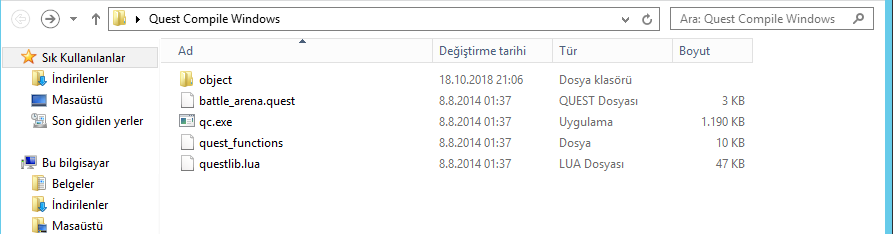
Sistem windows üzerinde çalışmaktadır. Exe uzantılı qc dosyası mevcuttur. Neden windows üzerinde buna gerek duymuşlar diye sorarsanız doğru çalışıp çalışmadığını denemek ve eğer filesten bir quest silmek istediğinde o quest nerelerde dosya oluşturmuş görebilmek için olabilir tam bende bilmiyorum.
Çalışması için klasörün içine quest dosyanızı atıp attığınız dosyayı qc.exe üzerine sürüklemeniz yeterli. Sonrasında zaten object klasörüne dosyalar oluşuyor.
Windows Üzerinde Quest Okutma
Metin2 gibi MMORPG oyunlarında quest sistemi, oyuncuların oyun dünyasında ilerlemesini sağlayan temel unsurlardan biridir. Bu sistem sayesinde oyuncular, görev alabilir, görevleri tamamlayarak ödüller kazanabilir ve hikâyeyi geliştirebilirler. Özellikle Metin2 sunucularında özelleştirilmiş quest'ler (görevler), oyun deneyimini zenginleştirmektedir. Ancak bazı geliştiriciler için quest okuma ve test süreçleri karmaşık olabilir. Bu yazıda, Windows işletim sistemi üzerinde nasıl Metin2 quest okutulacağına dair detaylı bir rehber sunacağız.
Metin2 Quest Nedir?
Metin2 quest sistemi, oyunculara belirli görevler vererek onlardan istenen işlemleri yapmalarını ister. Bu görevler; NPC ile konuşma, belirli sayıda düşman öldürme, eşya toplama gibi farklı eylemler içerebilir. Quest sistemleri genellikle Lua dilinde yazılmaktadır ve sunucu tarafında çalıştırılır. Quest script dosyaları (.lua uzantılı) ile tanımlanır.
Quest Dosyası Yapısı[/CONDOSYA]
Bir Metin2 quest dosyası genellikle şu yapıya sahiptir:
- Quest adı
- Trigger (tetikleyici)
- Görev başlangıcı (begin)
- Görev adımları
- Ödül (reward)
- Görev sonu (end)
Örnek bir quest dosyası şu şekildedir:
Windows Üzerinde Quest Test Ortamı Kurulumu
Windows üzerinde quest testi yapabilmek için bazı araçlara ihtiyaç vardır. Bunlar arasında en önemlisi bir Metin2 sunucu ortamıdır. Bu ortamı kurmak için aşağıdaki adımları takip edebilirsiniz:
1. Metin2 sunucu dosyalarını indirin.
2. MySQL veya SQLite veritabanı kurulumu yapın.
3. Sunucu yazılımlarını başlatın (auth, game, db).
4. Client tarafını açın ve oyuna giriş yapın.
Bu işlem tamamlandığında, quest dosyalarınızı ekleyebilir ve test edebilirsiniz.
Sık Karşılaşılan Quest Hataları
Quest geliştirme sürecinde bazı hatalar sıkça karşılaşılabilmektedir. Bunlar genellikle Lua script syntax hatalarıdır. Örneğin:
- Parantez eksikliği
- Syntax hatası
- Trigger eksikliği
- Flag yönetimi hataları
Hata ayıklama (debug) işlemleri için log dosyaları incelenmelidir. Ayrıca bazı geliştiriciler, quest dosyalarında özel flag'ler kullanarak durum yönetimini sağlarlar. Bu da quest'in doğru akışını kontrol etmede önemlidir.
Lua Script ile Quest Geliştirme
Metin2 quest sistemleri Lua dili ile yazılmaktadır. Lua, hafif ve güçlü bir script dilidir. Quest geliştirirken bazı önemli fonksiyonlar kullanılır:
- say() - Oyuncuya mesaj gösterir.
- notice() - Bilgi mesajı gönderir.
- clear_letter() - Mektup kutusunu temizler.
- set_state() - Quest'in durumunu değiştirir.
Quest geliştirme sürecinde bu fonksiyonları doğru kullanmak, görevlerin düzgün çalışmasını sağlar.
Daily Quest ve Reward Sistemleri
Gelişmiş Metin2 sunucularında günlük quest'ler (daily quest) popülerdir. Bu sistem sayesinde oyuncular her gün aynı görevi tekrarlayarak küçük ödüller kazanabilirler. Reward (ödül) sistemleri ise quest tamamlandığında oyuncuya verilen ödülleri tanımlar. Ödül olarak item, EXP, gold veya özel efektler verilebilir.
Sonuç
Windows üzerinde Metin2 quest okutmak, doğru ortam kurulumu ve script bilgisi ile oldukça kolay hale gelir. Quest geliştirme hem teknik hem de yaratıcı yönüyle ilginçtir. Doğru yapılandırılmış quest'ler, oyuncuların oyun içi motivasyonunu artırır ve sunucunuzun popülerliğini destekler. Daha fazla bilgi ve örnek quest script dosyası için Metin2Lobby üzerinden kaynaklara ulaşabilirsiniz.
Reading Quests on Windows
In MMORPG games like Metin2, the quest system is one of the key elements that allow players to progress within the game world. Through this system, players can take missions, earn rewards by completing them, and advance the story. Especially in Metin2 servers, customized quests enrich the gameplay experience. However, for some developers, the processes of reading and testing quests may be complex. In this article, we will provide a detailed guide on how to run Metin2 quests on Windows operating systems.
What Is a Metin2 Quest?
The Metin2 quest system asks players to perform certain actions by assigning specific tasks to them. These tasks may include talking to NPCs, killing a certain number of enemies, collecting items, etc. The quest systems are generally written in Lua language and executed on the server side. Quest script files are defined with .lua extensions.
Structure of a Quest File
A typical Metin2 quest file usually has the following structure:
- Quest name
- Trigger
- Beginning of the quest (begin)
- Quest steps
- Reward
- End of the quest (end)
An example quest file looks like this:
Setting Up a Quest Testing Environment on Windows
To test quests on Windows, certain tools are required. Among these, the most important is a Metin2 server environment. You can follow the steps below to set up this environment:
1. Download Metin2 server files.
2. Install MySQL or SQLite database.
3. Start server software (auth, game, db).
4. Open the client and log into the game.
Once this process is completed, you can add and test your quest files.
Common Quest Errors
Some errors frequently occur during the quest development process. These are usually Lua script syntax errors. For example:
- Missing parentheses
- Syntax error
- Missing trigger
- Flag management errors
Log files should be reviewed for debugging operations. Additionally, some developers use custom flags in quest files to manage states, which is important for controlling the correct flow of the quest.
Developing Quests with Lua Script
Metin2 quest systems are written in the Lua language. Lua is a lightweight and powerful scripting language. Some important functions used while developing quests include:
- say() - Displays a message to the player.
- notice() - Sends an information message.
- clear_letter() - Clears the letter box.
- set_state() - Changes the state of the quest.
Properly using these functions during the quest development process ensures that the missions work correctly.
Daily Quest and Reward Systems
Daily quests are popular in advanced Metin2 servers. This system allows players to complete the same mission each day and earn small rewards. Reward systems define the rewards given to the player upon completion of a quest. Rewards can include items, EXP, gold, or special effects.
Conclusion
Running Metin2 quests on Windows becomes quite easy with proper environment setup and script knowledge. Quest development is interesting from both technical and creative perspectives. Well-configured quests increase player motivation within the game and support the popularity of your server. For more information and example quest script files, visit Metin2Lobby.
Daha önce paylaşıldı mı bilmiyorum.
Sistem windows üzerinde çalışmaktadır. Exe uzantılı qc dosyası mevcuttur. Neden windows üzerinde buna gerek duymuşlar diye sorarsanız doğru çalışıp çalışmadığını denemek ve eğer filesten bir quest silmek istediğinde o quest nerelerde dosya oluşturmuş görebilmek için olabilir
tam bende bilmiyorum. Çalışması için klasörün içine quest dosyanızı atıp attığınız dosyayı qc.exe üzerine sürüklemeniz yeterli. Sonrasında zaten object klasörüne dosyalar oluşuyor.
Ziyaretçiler için gizlenmiş link,görmek için üye olmalısınız!
Giriş yap veya üye ol.
Ziyaretçiler için gizlenmiş link,görmek için üye olmalısınız!
Giriş yap veya üye ol.
Windows Üzerinde Quest Okutma
Metin2 gibi MMORPG oyunlarında quest sistemi, oyuncuların oyun dünyasında ilerlemesini sağlayan temel unsurlardan biridir. Bu sistem sayesinde oyuncular, görev alabilir, görevleri tamamlayarak ödüller kazanabilir ve hikâyeyi geliştirebilirler. Özellikle Metin2 sunucularında özelleştirilmiş quest'ler (görevler), oyun deneyimini zenginleştirmektedir. Ancak bazı geliştiriciler için quest okuma ve test süreçleri karmaşık olabilir. Bu yazıda, Windows işletim sistemi üzerinde nasıl Metin2 quest okutulacağına dair detaylı bir rehber sunacağız.
Metin2 Quest Nedir?
Metin2 quest sistemi, oyunculara belirli görevler vererek onlardan istenen işlemleri yapmalarını ister. Bu görevler; NPC ile konuşma, belirli sayıda düşman öldürme, eşya toplama gibi farklı eylemler içerebilir. Quest sistemleri genellikle Lua dilinde yazılmaktadır ve sunucu tarafında çalıştırılır. Quest script dosyaları (.lua uzantılı) ile tanımlanır.
Quest Dosyası Yapısı[/CONDOSYA]
Bir Metin2 quest dosyası genellikle şu yapıya sahiptir:
- Quest adı
- Trigger (tetikleyici)
- Görev başlangıcı (begin)
- Görev adımları
- Ödül (reward)
- Görev sonu (end)
Örnek bir quest dosyası şu şekildedir:
Kod:
quest sample_quest begin[BR][/BR]state start begin[BR][/BR]when login with pc.level >= 10 begin[BR][/BR]say 'Merhaba, sana özel bir görevim var.'[BR][/BR]end[BR][/BR]end[BR][/BR]endWindows Üzerinde Quest Test Ortamı Kurulumu
Windows üzerinde quest testi yapabilmek için bazı araçlara ihtiyaç vardır. Bunlar arasında en önemlisi bir Metin2 sunucu ortamıdır. Bu ortamı kurmak için aşağıdaki adımları takip edebilirsiniz:
1. Metin2 sunucu dosyalarını indirin.
2. MySQL veya SQLite veritabanı kurulumu yapın.
3. Sunucu yazılımlarını başlatın (auth, game, db).
4. Client tarafını açın ve oyuna giriş yapın.
Bu işlem tamamlandığında, quest dosyalarınızı ekleyebilir ve test edebilirsiniz.
Sık Karşılaşılan Quest Hataları
Quest geliştirme sürecinde bazı hatalar sıkça karşılaşılabilmektedir. Bunlar genellikle Lua script syntax hatalarıdır. Örneğin:
- Parantez eksikliği
- Syntax hatası
- Trigger eksikliği
- Flag yönetimi hataları
Hata ayıklama (debug) işlemleri için log dosyaları incelenmelidir. Ayrıca bazı geliştiriciler, quest dosyalarında özel flag'ler kullanarak durum yönetimini sağlarlar. Bu da quest'in doğru akışını kontrol etmede önemlidir.
Lua Script ile Quest Geliştirme
Metin2 quest sistemleri Lua dili ile yazılmaktadır. Lua, hafif ve güçlü bir script dilidir. Quest geliştirirken bazı önemli fonksiyonlar kullanılır:
- say() - Oyuncuya mesaj gösterir.
- notice() - Bilgi mesajı gönderir.
- clear_letter() - Mektup kutusunu temizler.
- set_state() - Quest'in durumunu değiştirir.
Quest geliştirme sürecinde bu fonksiyonları doğru kullanmak, görevlerin düzgün çalışmasını sağlar.
Daily Quest ve Reward Sistemleri
Gelişmiş Metin2 sunucularında günlük quest'ler (daily quest) popülerdir. Bu sistem sayesinde oyuncular her gün aynı görevi tekrarlayarak küçük ödüller kazanabilirler. Reward (ödül) sistemleri ise quest tamamlandığında oyuncuya verilen ödülleri tanımlar. Ödül olarak item, EXP, gold veya özel efektler verilebilir.
Sonuç
Windows üzerinde Metin2 quest okutmak, doğru ortam kurulumu ve script bilgisi ile oldukça kolay hale gelir. Quest geliştirme hem teknik hem de yaratıcı yönüyle ilginçtir. Doğru yapılandırılmış quest'ler, oyuncuların oyun içi motivasyonunu artırır ve sunucunuzun popülerliğini destekler. Daha fazla bilgi ve örnek quest script dosyası için Metin2Lobby üzerinden kaynaklara ulaşabilirsiniz.
Reading Quests on Windows
In MMORPG games like Metin2, the quest system is one of the key elements that allow players to progress within the game world. Through this system, players can take missions, earn rewards by completing them, and advance the story. Especially in Metin2 servers, customized quests enrich the gameplay experience. However, for some developers, the processes of reading and testing quests may be complex. In this article, we will provide a detailed guide on how to run Metin2 quests on Windows operating systems.
What Is a Metin2 Quest?
The Metin2 quest system asks players to perform certain actions by assigning specific tasks to them. These tasks may include talking to NPCs, killing a certain number of enemies, collecting items, etc. The quest systems are generally written in Lua language and executed on the server side. Quest script files are defined with .lua extensions.
Structure of a Quest File
A typical Metin2 quest file usually has the following structure:
- Quest name
- Trigger
- Beginning of the quest (begin)
- Quest steps
- Reward
- End of the quest (end)
An example quest file looks like this:
Kod:
quest sample_quest begin[BR][/BR]state start begin[BR][/BR]when login with pc.level >= 10 begin[BR][/BR]say 'Hello, I have a special mission for you.'[BR][/BR]end[BR][/BR]end[BR][/BR]endSetting Up a Quest Testing Environment on Windows
To test quests on Windows, certain tools are required. Among these, the most important is a Metin2 server environment. You can follow the steps below to set up this environment:
1. Download Metin2 server files.
2. Install MySQL or SQLite database.
3. Start server software (auth, game, db).
4. Open the client and log into the game.
Once this process is completed, you can add and test your quest files.
Common Quest Errors
Some errors frequently occur during the quest development process. These are usually Lua script syntax errors. For example:
- Missing parentheses
- Syntax error
- Missing trigger
- Flag management errors
Log files should be reviewed for debugging operations. Additionally, some developers use custom flags in quest files to manage states, which is important for controlling the correct flow of the quest.
Developing Quests with Lua Script
Metin2 quest systems are written in the Lua language. Lua is a lightweight and powerful scripting language. Some important functions used while developing quests include:
- say() - Displays a message to the player.
- notice() - Sends an information message.
- clear_letter() - Clears the letter box.
- set_state() - Changes the state of the quest.
Properly using these functions during the quest development process ensures that the missions work correctly.
Daily Quest and Reward Systems
Daily quests are popular in advanced Metin2 servers. This system allows players to complete the same mission each day and earn small rewards. Reward systems define the rewards given to the player upon completion of a quest. Rewards can include items, EXP, gold, or special effects.
Conclusion
Running Metin2 quests on Windows becomes quite easy with proper environment setup and script knowledge. Quest development is interesting from both technical and creative perspectives. Well-configured quests increase player motivation within the game and support the popularity of your server. For more information and example quest script files, visit Metin2Lobby.
