

merhaba yabancı filesten çıkardığım yeni ejderha güle güle kullanın
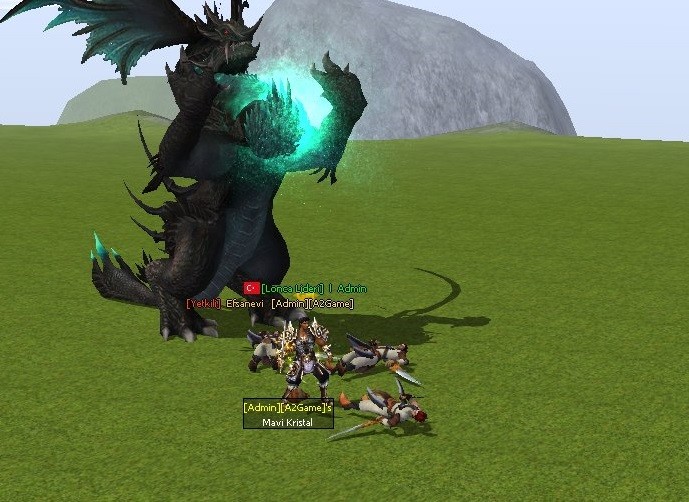
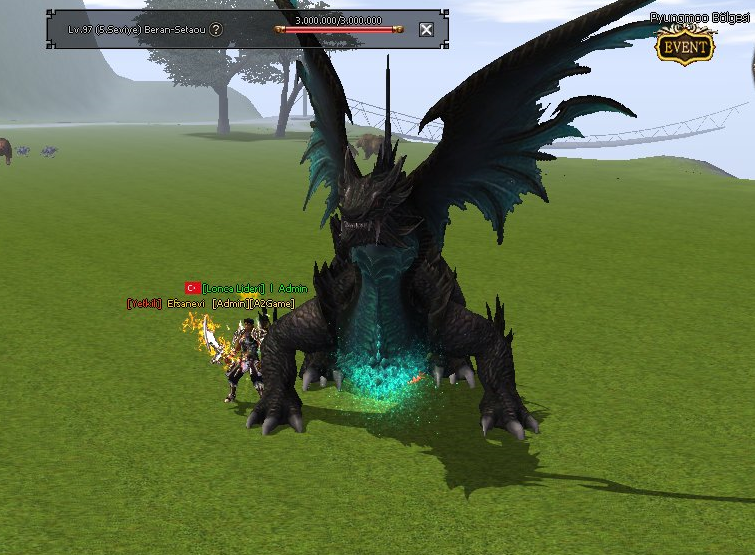
Metin2 oyunu, özellikle 3D modelleme tutkunları arasında uzun yıllardır büyük ilgi çekmekte. Son zamanlarda, Metin2 dünyasında yeni ejder modeli yaratımı büyük bir heyecanla karşılandı. Bu makalede, Metin2 özelinde ejder gibi epik yapıların 3D modelleme sürecinden bahsedeceğiz. Ayrıca model edit, texture, UV mapping, animation, gr2 formatı ve Blender, 3ds Max gibi yazılımlarla nasıl çalışılacağına dair ipuçları sunacağız.
Yeni Ejder Modeli Nedir?
Yeni ejder modeli, Metin2 sunucularında oynanış deneyimini zenginleştirmek amacıyla geliştirilen özel bir NPC ya da monster modelidir. Bu modelin temel amacı, oyunculara daha etkileyici bir görsel deneyim sunmak ve oyun içi atmosferi daha büyüleyici hale getirmektir. Metin2 özelinde tasarlanan bu ejder modeli, Blender veya 3ds Max gibi 3D modelleme programlarıyla oluşturulabilir. Ardından GR2 formatına dönüştürülerek oyun içine entegre edilir.
Model Edit Süreci ve Araçlar
Metin2 özelinde yeni ejder modeli tasarlamak isteyen sanatçılar için model edit süreci oldukça önemlidir. Bu süreçte öncelikle mesh yapısı üzerinde çalışılır. Mesh, modelin temel iskeletidir ve doğru şekilde oluşturulması, hem animation hem de rigging süreçleri için kritiktir. Rigging işlemi, modelin hareket ettirilebilir bone yapısının ayarlandığı adımdır. Metin2'nin desteklediği GR2 formatında çalışabilmek için granny3d araçları da kullanılır. Bu araçlar sayesinde import ve export işlemleri kolayca yapılır.
Texture ve UV Mapping
Her ne kadar yeni ejder modeli harika bir mesh yapısına sahip olsa da, ona can verecek olan şey texture ve UV mapping işlevidir. UV mapping, 3D modelin yüzeyine dokuların doğru şekilde uygulanmasını sağlar. Metin2 için özel olarak hazırlanan texture setleri, skin ve visual mod olarak tanımlanabilir. Bu dokular, modelin görsel kalitesini ciddi anlamda artırır.
Animation ve Hareket Sistemleri
Metin2 özelinde yeni ejder modeli için animasyonlar da oldukça önemlidir. Animation dosyaları genellikle GR2 formatında olur. Blender gibi yazılımlarla hazırlanan animation verileri, Metin2 motoruna aktarılmadan önce test edilir. Bu sayede ejderin koşması, saldırması, kanat çırpması gibi tüm hareketler doğal gözükür.
Özel Efekt ve Ortam Entegrasyonu
Yeni ejder modeli, sadece bir karakter olarak değil aynı zamanda effect model, map object veya terrain üzerinde etkileşimli bir yapı olarak da kullanılabilir. Özellikle dungeon model veya building model içeren haritalarda bu tür modeller, oyun atmosferini ciddi şekilde destekler. Metin2 dünyasında custom model entegrasyonu, pack model sistemleriyle birlikte daha da kolay hale gelmiştir.
Nasıl Başlanır?
Metin2 özelinde yeni ejder modeli tasarlamaya başlamak istiyorsanız, öncelikle Blender veya 3ds Max gibi bir yazılım öğrenmelisiniz. Ardından GR2 formatına uygun export yöntemlerini öğrenmek gerekir. Metin2Dev ve MartySama gibi topluluklar, bu konuda birçok kaynak sunar. EterPack ve 3D art projeleri de örnek alınabilir.
Sonuç
Yeni ejder modeli, Metin2 oyununda 3D sanatının en çarpıcı örneklerinden biridir. Bu model, yalnızca estetik açıdan değil, teknik olarak da dikkat çeker. Metin2 dünyasında model replace, custom model ve visual mod gibi alanlarda çalışan geliştiriciler için büyük bir fırsat sunar. Metin2Lobby.com olarak, bu tür projeleri desteklemeye devam edeceğiz.
Metin2 continues to attract 3D modeling enthusiasts with its long-standing popularity. Recently, the creation of a new dragon model in the Metin2 world has been welcomed with great excitement. In this article, we will discuss the 3D modeling process of epic structures like dragons within Metin2. Additionally, we will provide tips on how to work with tools such as Blender, 3ds Max, and formats like GR2, along with topics such as model editing, textures, UV mapping, and animation.
What is the New Dragon Model?
The new dragon model is a special NPC or monster model developed to enhance gameplay experience on Metin2 servers. The primary goal of this model is to offer players a more impressive visual experience and make the game atmosphere more captivating. This dragon model designed specifically for Metin2 can be created using 3D modeling programs like Blender or 3ds Max. It is then converted into GR2 format and integrated into the game.
Model Editing Process and Tools
For artists who want to design a new dragon model tailored for Metin2, the model editing process is highly important. During this phase, the mesh structure is primarily worked on. The mesh serves as the basic skeleton of the model and must be correctly built for both animation and rigging processes. Rigging is the step where the movable bone structure of the model is configured. To work in the GR2 format supported by Metin2, granny3d tools are used. These tools allow easy import and export operations.
Textures and UV Mapping
Even if the new dragon model has an excellent mesh structure, what brings it to life is the texture and UV mapping. UV mapping ensures textures are applied correctly onto the surface of the 3D model. Texture sets specially prepared for Metin2 can be described as skins or visual mods. These textures significantly enhance the visual quality of the model.
Animations and Movement Systems
Animations are also very important for a new dragon model tailored for Metin2. Animation files are usually in GR2 format. Animation data created in software like Blender is tested before being transferred into the Metin2 engine. This ensures that all movements of the dragon—such as running, attacking, and flapping wings—look natural.
Special Effects and Environment Integration
The new dragon model can function not only as a character but also as an effect model, map object, or interactive element on terrain. Especially in maps containing dungeon models or building models, such models significantly support the game's atmosphere. Custom model integration in the Metin2 world has become easier with pack model systems.
How to Get Started?
To begin designing a new dragon model for Metin2, you first need to learn software like Blender or 3ds Max. Then, you should learn methods for exporting in GR2 format. Communities like Metin2Dev and MartySama offer many resources on this topic. Projects like EterPack and 3D art can also serve as examples.
Conclusion
The new dragon model is one of the most striking examples of 3D art in the Metin2 game. This model is remarkable not only aesthetically but also technically. For developers working in areas like model replace, custom model, and visual mod in the Metin2 world, this presents a significant opportunity. As Metin2Lobby.com, we will continue to support such projects.
Ziyaretçiler için gizlenmiş link,görmek için üye olmalısınız!
Giriş yap veya üye ol.
Ziyaretçiler için gizlenmiş link,görmek için üye olmalısınız!
Giriş yap veya üye ol.
Metin2'de Yeni Ejder Modeli: 3D Sanatında Yeni Bir Dönüm Noktası
Metin2 oyunu, özellikle 3D modelleme tutkunları arasında uzun yıllardır büyük ilgi çekmekte. Son zamanlarda, Metin2 dünyasında yeni ejder modeli yaratımı büyük bir heyecanla karşılandı. Bu makalede, Metin2 özelinde ejder gibi epik yapıların 3D modelleme sürecinden bahsedeceğiz. Ayrıca model edit, texture, UV mapping, animation, gr2 formatı ve Blender, 3ds Max gibi yazılımlarla nasıl çalışılacağına dair ipuçları sunacağız.
Yeni Ejder Modeli Nedir?
Yeni ejder modeli, Metin2 sunucularında oynanış deneyimini zenginleştirmek amacıyla geliştirilen özel bir NPC ya da monster modelidir. Bu modelin temel amacı, oyunculara daha etkileyici bir görsel deneyim sunmak ve oyun içi atmosferi daha büyüleyici hale getirmektir. Metin2 özelinde tasarlanan bu ejder modeli, Blender veya 3ds Max gibi 3D modelleme programlarıyla oluşturulabilir. Ardından GR2 formatına dönüştürülerek oyun içine entegre edilir.
Model Edit Süreci ve Araçlar
Metin2 özelinde yeni ejder modeli tasarlamak isteyen sanatçılar için model edit süreci oldukça önemlidir. Bu süreçte öncelikle mesh yapısı üzerinde çalışılır. Mesh, modelin temel iskeletidir ve doğru şekilde oluşturulması, hem animation hem de rigging süreçleri için kritiktir. Rigging işlemi, modelin hareket ettirilebilir bone yapısının ayarlandığı adımdır. Metin2'nin desteklediği GR2 formatında çalışabilmek için granny3d araçları da kullanılır. Bu araçlar sayesinde import ve export işlemleri kolayca yapılır.
Texture ve UV Mapping
Her ne kadar yeni ejder modeli harika bir mesh yapısına sahip olsa da, ona can verecek olan şey texture ve UV mapping işlevidir. UV mapping, 3D modelin yüzeyine dokuların doğru şekilde uygulanmasını sağlar. Metin2 için özel olarak hazırlanan texture setleri, skin ve visual mod olarak tanımlanabilir. Bu dokular, modelin görsel kalitesini ciddi anlamda artırır.
Animation ve Hareket Sistemleri
Metin2 özelinde yeni ejder modeli için animasyonlar da oldukça önemlidir. Animation dosyaları genellikle GR2 formatında olur. Blender gibi yazılımlarla hazırlanan animation verileri, Metin2 motoruna aktarılmadan önce test edilir. Bu sayede ejderin koşması, saldırması, kanat çırpması gibi tüm hareketler doğal gözükür.
Özel Efekt ve Ortam Entegrasyonu
Yeni ejder modeli, sadece bir karakter olarak değil aynı zamanda effect model, map object veya terrain üzerinde etkileşimli bir yapı olarak da kullanılabilir. Özellikle dungeon model veya building model içeren haritalarda bu tür modeller, oyun atmosferini ciddi şekilde destekler. Metin2 dünyasında custom model entegrasyonu, pack model sistemleriyle birlikte daha da kolay hale gelmiştir.
Nasıl Başlanır?
Metin2 özelinde yeni ejder modeli tasarlamaya başlamak istiyorsanız, öncelikle Blender veya 3ds Max gibi bir yazılım öğrenmelisiniz. Ardından GR2 formatına uygun export yöntemlerini öğrenmek gerekir. Metin2Dev ve MartySama gibi topluluklar, bu konuda birçok kaynak sunar. EterPack ve 3D art projeleri de örnek alınabilir.
Sonuç
Yeni ejder modeli, Metin2 oyununda 3D sanatının en çarpıcı örneklerinden biridir. Bu model, yalnızca estetik açıdan değil, teknik olarak da dikkat çeker. Metin2 dünyasında model replace, custom model ve visual mod gibi alanlarda çalışan geliştiriciler için büyük bir fırsat sunar. Metin2Lobby.com olarak, bu tür projeleri desteklemeye devam edeceğiz.
New Dragon Model in Metin2: A Turning Point in 3D Art
Metin2 continues to attract 3D modeling enthusiasts with its long-standing popularity. Recently, the creation of a new dragon model in the Metin2 world has been welcomed with great excitement. In this article, we will discuss the 3D modeling process of epic structures like dragons within Metin2. Additionally, we will provide tips on how to work with tools such as Blender, 3ds Max, and formats like GR2, along with topics such as model editing, textures, UV mapping, and animation.
What is the New Dragon Model?
The new dragon model is a special NPC or monster model developed to enhance gameplay experience on Metin2 servers. The primary goal of this model is to offer players a more impressive visual experience and make the game atmosphere more captivating. This dragon model designed specifically for Metin2 can be created using 3D modeling programs like Blender or 3ds Max. It is then converted into GR2 format and integrated into the game.
Model Editing Process and Tools
For artists who want to design a new dragon model tailored for Metin2, the model editing process is highly important. During this phase, the mesh structure is primarily worked on. The mesh serves as the basic skeleton of the model and must be correctly built for both animation and rigging processes. Rigging is the step where the movable bone structure of the model is configured. To work in the GR2 format supported by Metin2, granny3d tools are used. These tools allow easy import and export operations.
Textures and UV Mapping
Even if the new dragon model has an excellent mesh structure, what brings it to life is the texture and UV mapping. UV mapping ensures textures are applied correctly onto the surface of the 3D model. Texture sets specially prepared for Metin2 can be described as skins or visual mods. These textures significantly enhance the visual quality of the model.
Animations and Movement Systems
Animations are also very important for a new dragon model tailored for Metin2. Animation files are usually in GR2 format. Animation data created in software like Blender is tested before being transferred into the Metin2 engine. This ensures that all movements of the dragon—such as running, attacking, and flapping wings—look natural.
Special Effects and Environment Integration
The new dragon model can function not only as a character but also as an effect model, map object, or interactive element on terrain. Especially in maps containing dungeon models or building models, such models significantly support the game's atmosphere. Custom model integration in the Metin2 world has become easier with pack model systems.
How to Get Started?
To begin designing a new dragon model for Metin2, you first need to learn software like Blender or 3ds Max. Then, you should learn methods for exporting in GR2 format. Communities like Metin2Dev and MartySama offer many resources on this topic. Projects like EterPack and 3D art can also serve as examples.
Conclusion
The new dragon model is one of the most striking examples of 3D art in the Metin2 game. This model is remarkable not only aesthetically but also technically. For developers working in areas like model replace, custom model, and visual mod in the Metin2 world, this presents a significant opportunity. As Metin2Lobby.com, we will continue to support such projects.
