

Mega [/FONT]
Oyunculara eklemek isteyenler:
Ziyaretçiler için gizlenmiş link,görmek için üye olmalısınız!
Giriş yap veya üye ol.
Ziyaretçiler için gizlenmiş link,görmek için üye olmalısınız!
Giriş yap veya üye ol.
Ziyaretçiler için gizlenmiş link,görmek için üye olmalısınız!
Giriş yap veya üye ol.
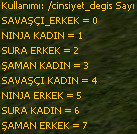
cmd.cpp Aratın:
{ "cinsiyet_degis", do_cinsiyet_degis, 0, POS_DEAD, GM_HIGH_WIZARD },
Değiştirin;
{ "cinsiyet_degis", do_cinsiyet_degis, 0, POS_DEAD, GM_PLAYER },
cmd_gm'deki kodu silin
Cmd_general.cpp'ye ekleyin.
<blockquote data-attributes="" data-quote="hero09090909" data-source="post: 19083484" class="bbCodeBlock bbCodeBlock--expandable bbCodeBlock--quote js-expandWatch">
Kod:
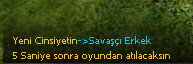
if (ch->IsPolymorphed())[FONT=Verdana] [/FONT]return;Kanıt:
WoM2'deki Genel Sohbet Penceresinde Ticaret Kanalı Oluşturma Rehberi
Metin2 özel sunucularında (private server) kullanıcı deneyimini artırmak için sohbet sistemleri oldukça önemlidir. Özellikle oyuncuların eşya, altın veya karakter alım-satımı yapabildiği ticaret kanalları, aktif bir ekonomi için hayati bir rol oynar. Bu rehbere, C++ ve Python tabanlı sistemler kullanarak World of Metin2 (WoM2) istemcisi üzerinde genel sohbet penceresine özel bir 'Ticaret Kanalı' entegrasyonu nasıl yapılır detaylıca anlatılmaktadır.
1. Giriş ve Amacı
WoM2, gelişmiş grafiksel arayüzüyle bilinen modern bir Metin2 istemcisidir. Ancak bazı özel sunucular, kullanıcıların belirli sohbet kanallarını kullanmasını engelleyebilir veya sınırlı bir yapı sunabilir. Bu durumda, geliştiricilerin kendi özel kanallarını (örneğin Ticaret Kanalı) oluşturması gerekir. Bu işlem; oyun içi ekonomiyi desteklemek, kullanıcı etkileşimini artırmak ve sunucu sadakatini yükseltmek açısından büyük önem taşır.
2. Gerekli Sistem Bileşenleri
- C++ Game Sunucu Kodları (Game Server SRC)
- Python GUI Uygulamaları (Py Root, UIScript)
- Client Side Modifikasyon (Client SRC)
- Auth ve DB Bileşenleri
- WoM2 İstemci Kaynağı
3. Ticaret Kanalı için C++ Tarafında Gerekli Değişiklikler
C++ tarafında, oyun sunucusu kodlarında sohbet mesajlarını işleyen fonksiyonlar değiştirilmelidir. Özellikle CHatHandler sınıfı altında yeni bir kanal tanımlanmalı ve bu kanal üzerinden gelen mesajlar ayrıştırılmalıdır. Örneğin, '!t' gibi bir komutla başlayan mesajlar otomatik olarak 'TradeChannel' olarak tanımlanabilir. Bu işlem için ChatPacket.cpp dosyasında gerekli filtreleme yapılmalıdır.
4. Python Tarafında Sohbet Penceresi Entegrasyonu
Py Root dosyalarında bulunan chat.py ve chatwnd.py gibi modüllerde değişiklik yapılması gerekir. Burada, 'Trade Channel' adında bir sekme (tab) oluşturulmalı ve bu kanala ait mesajlar farklı bir renk veya stil ile gösterilmelidir. Bu işlem için UIScript alt yapısı kullanılır. Örneğin, !t mesajları kırmızı renkte ve kalın yazı tipinde gösterilebilir. Böylece kullanıcılar bu kanalı kolayca fark eder.
5. İstemci Tarafında Görsel Arayüz Değişiklikleri
WoM2 istemcisinde sohbet penceresi genellikle XML veya UIScript dosyaları ile yönetilir. Bu dosyalarda yeni bir sekme (chat tab) eklenerek, 'Ticaret Kanalı' için özel bir UI tasarımı yapılabilir. Bu sayede kullanıcılar mesaj gönderirken hangi kanala yazdıklarını seçebilirler. Bu işlem sırasında dikkat edilmesi gereken en önemli konu, mevcut yapıyı bozmamak ve diğer kanalların çalışabilirliğini korumaktır.
6. Veritabanı ve Güvenlik Önlemleri
Ticaret kanalı aktif olduktan sonra spam ve dolandırıcılık riski artar. Bu nedenle, mesaj gönderme sıklığı, seviye veya item kontrolü gibi filtreler uygulanmalıdır. Bu kontroller hem Auth hem de Game sunucularında C++ seviyesinde yapılabilir. Ayrıca, DB tarafında loglama işlemleri ile suistimal durumları takip edilebilir.
7. Test ve Canlıya Alma
Tüm yapılandırmalar tamamlandıktan sonra, test sunucusunda farklı kullanıcılarla çeşitli senaryolar denenmelidir. Mesajların doğru kanala gittiği, UI'nin sorunsuz çalıştığı ve güvenlik önlemlerinin işlediği kontrol edilmelidir. Canlıya alınmadan önce mutlaka tüm sistemlerde yedek alma işlemi yapılmalıdır.
Sonuç
WoM2 istemcisinde genel sohbet penceresine entegre edilen bir Ticaret Kanalı, sunucu sahiplerinin oyun içi ekonomiyi yönetmesine yardımcı olur. Bu rehberde anlatılan adımlar, C++ ve Python bilgisi olan geliştiriciler için bir yol haritası niteliğindedir. Metin2 özel sunucu geliştirme sürecinde bu gibi özelleştirmeler, kullanıcı memnuniyetini ve sunucu kalitesini artırır.
Creating a Trade Channel in General Chat Window of WoM2
In private Metin2 servers, chat systems are crucial for enhancing the user experience. Especially trade channels where players can sell or buy items, gold or characters play a vital role in maintaining an active economy. This guide explains in detail how to integrate a custom 'Trade Channel' into the general chat window of the World of Metin2 (WoM2) client using C++ and Python-based systems.
1. Introduction and Purpose
WoM2 is known for its advanced graphical interface. However, some private servers may block or limit users from using specific chat channels. In such cases, developers must create their own custom channels (e.g., Trade Channel). This process is critical for supporting in-game economy, increasing user interaction, and boosting server loyalty.
2. Required System Components
- C++ Game Server Source Codes (Game Server SRC)
- Python GUI Applications (Py Root, UIScript)
- Client Side Modifications (Client SRC)
- Auth and DB Components
- WoM2 Client Source
3. Necessary Changes on C++ Side for Trade Channel
On the C++ side, functions that handle chat messages in the game server code must be modified. Specifically, within the CHatHandler class, a new channel should be defined and messages coming through this channel should be parsed separately. For example, messages starting with a command like '!t' can be automatically identified as 'TradeChannel'. Filtering needs to be implemented in the ChatPacket.cpp file for this purpose.
4. Chat Window Integration on Python Side
Modifications need to be made in modules such as chat.py and chatwnd.py located in Py Root files. Here, a tab named 'Trade Channel' should be created and messages belonging to this channel should be displayed in a different color or style. The UIScript infrastructure is used for this. For instance, !t messages could be shown in bold and red font, allowing users to easily identify this channel.
5. Visual Interface Changes on Client Side
In the WoM2 client, the chat window is usually managed via XML or UIScript files. By adding a new tab (chat tab) in these files, a custom UI design can be created for the 'Trade Channel'. Users will then be able to select which channel they are sending messages to. While doing this, care must be taken not to break existing structures and maintain functionality of other channels.
6. Database and Security Measures
Once the trade channel is active, risks of spam and fraud increase. Therefore, filters such as message sending frequency, level checks, or item validation should be applied. These checks can be done at the C++ level in both Auth and Game servers. Additionally, logging operations on the DB side allow tracking of abuse cases.
7. Testing and Going Live
After all configurations are complete, various scenarios should be tested with different users on a test server. It must be ensured that messages go to the correct channel, the UI works smoothly, and security measures function properly. Before going live, backup procedures must be performed across all systems.
Conclusion
A Trade Channel integrated into the general chat window of the WoM2 client helps server owners manage the in-game economy. This guide serves as a roadmap for developers with knowledge in C++ and Python. Such customizations during the Metin2 private server development process enhance user satisfaction and server quality.
