

Forumda Paylaşıldımı Görmedim Eğer Paylaşıldıysa Raporlayınız.
İyi Kullanımlar
İyi Forumlar...
İyi Kullanımlar
İyi Forumlar...
Ziyaretçiler için gizlenmiş link,görmek için üye olmalısınız!
Giriş yap veya üye ol.
Ziyaretçiler için gizlenmiş link,görmek için üye olmalısınız!
Giriş yap veya üye ol.
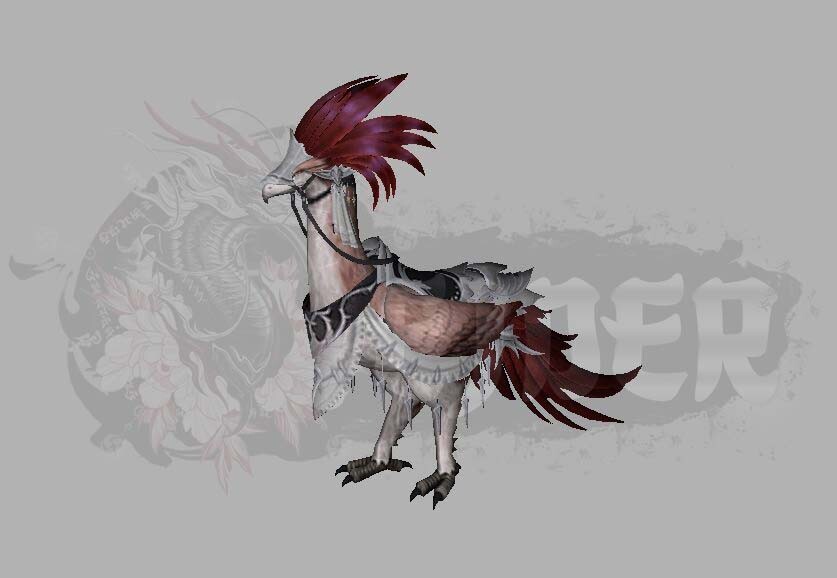
EJDER-Binek [4]: Metin2 Oyununda Özel Yaratık Modelleme ve Geliştirme
Metin2 dünyasında benzersiz bir deneyim arayışındaysanız, EJDER-Binek [4] modeliyle tanışmanızı öneriyoruz. Bu özel yaratık modeli, hem estetik hem de fonksiyonel açıdan oyun içinde dikkat çeken bir öge. Bu yazıda, EJDER-Binek [4] modelinin 3D yapısı, Metin2 oyunu içinde nasıl entegre edileceği, hangi araçlarla geliştirildiği ve bu modelin sunuculara nasıl entegre edileceği gibi konulara değineceğiz.
EJDER-Binek [4] Nedir?
EJDER-Binek [4], Metin2 oyununda oyuncuların kullanabileceği özel bir binek modelidir. Geleneksel at veya kuş modellerinden farklı olarak, ejderha temalı bu binek, hem karaktere destek sağlar hem de görsel olarak oyun atmosferini zenginleştirir. Bu model, Metin2 3D modelleme uzmanları tarafından özel olarak tasarlanmıştır ve yüksek detay seviyesi ile dikkat çeker.
3D Modelleme ve Teknik Özellikler
EJDER-Binek [4] modeli, genellikle 3ds Max veya Blender gibi yazılımlar kullanılarak oluşturulur. Modelleme sürecinde dikkat edilmesi gereken en önemli konulardan biri, UV mapping ve dokuların doğru uygulanmasıdır. Ayrıca, modelin GR2 veya Granny3D formatında dışa aktarılması gerekir ki Metin2 oyun motoruna uyumlu hale gelsin.
Model Edit ve Entegrasyon Süreci
Oyuna özel bir model entegre etmek için Metin2 model edit işlemleri gereklidir. Bu süreçte, modelin mesh, bone, animation gibi yapıları kontrol edilir. EJDER-Binek [4] modeli için animasyonlar, yürüme, koşma ve uçuş gibi hareketleri içerebilir. Bu animasyonlar, Metin2 oyun motoru ile uyumlu olacak şekilde ayarlanmalıdır.
Nasıl Kullanılır?
Sunuculara özel model entegrasyonu için genellikle EterPack veya Martysama gibi sistemler kullanılır. Bu sistemler sayesinde, EJDER-Binek [4] modeli kolayca sunucuya entegre edilir. Oyuncular, bu bineği kullanarak hem daha hızlı hareket eder hem de karakterlerini özelleştirme imkanı bulurlar.
Özel Efekt ve Doku Kullanımı
Modelin görsel kalitesini artırmak için özel efekt ve doku sistemleri kullanılır. Metin2 texture ve skin gibi işlemler, modelin daha gerçekçi ve estetik görünmesini sağlar. Bu işlemler sırasında UV Map yapısının doğru ayarlanması büyük önem taşır.
Yaratıcılığınızı Serbest Bırakın
Metin2 oyununda model değiştirme veya özelleştirme işlemleri, geliştiriciler ve oyuncular için büyük bir keyif kaynağıdır. EJDER-Binek [4] gibi özel modeller, oyunun görsel zenginliğini artırırken, aynı zamanda topluluk tarafından takdir edilen özgün içerikler olarak da değerlendirilir. Not: Modellerin sunuculara entegrasyonu sırasında lisans ve sunucu uyumluluğu gibi konulara dikkat edilmelidir.
Sonuç
EJDER-Binek [4], Metin2 oyununda özel modelleme yapmayı sevenler için ideal bir örnektir. Hem teknik hem de yaratıcı yönüyle ilham verici olan bu model, 3D modelleme becerilerinizi geliştirmek isteyenler için harika bir başlangıç noktasıdır.
Dragon-Mount [4]: Special Creature Modeling and Development in Metin2
Metin2 world offers unique experiences for those looking for something special, and we recommend meeting the Dragon-Mount [4] model. This unique creature model stands out both visually and functionally within the game. In this article, we will cover topics such as the 3D structure of the Dragon-Mount [4], how it can be integrated into the Metin2 game, what tools were used during its development, and how this model can be integrated into servers.
What is Dragon-Mount [4]?
Dragon-Mount [4] is a special mount model available for players in the Metin2 game. Unlike traditional horse or bird models, this dragon-themed mount supports the player character while enhancing the game's visual atmosphere. Designed by Metin2 3D modeling experts, this model stands out with its high level of detail.
3D Modeling and Technical Features
The Dragon-Mount [4] model is typically created using software like 3ds Max or Blender. One of the most important aspects during the modeling process is correct UV mapping and texture application. Additionally, the model must be exported in GR2 or Granny3D formats to ensure compatibility with the Metin2 game engine.
Model Editing and Integration Process
Integrating a custom model into the game requires Metin2 model editing processes. During this phase, structures like mesh, bone, and animation are checked. For the Dragon-Mount [4], animations may include walking, running, and flying movements. These animations need to be adjusted to work seamlessly with the Metin2 game engine.
How to Use It?
Custom model integration into servers usually involves systems like EterPack or Martysama. With these systems, the Dragon-Mount [4] model can easily be integrated into servers. Players can use this mount to move faster and customize their characters more effectively.
Special Effects and Texture Usage
To enhance the visual quality of the model, special effects and textures are applied. Operations like Metin2 texture and skin make the model look more realistic and aesthetic. Correct setup of the UV Map structure is critical during these processes.
Unleash Your Creativity
Changing or customizing models in Metin2 is a source of great enjoyment for both developers and players. Special models like Dragon-Mount [4] increase the visual richness of the game while also being appreciated as original content by the community. Note: Attention should be paid to licensing and server compatibility when integrating models into servers.
Conclusion
Dragon-Mount [4] serves as an excellent example for those who enjoy custom modeling in Metin2. With both technical and creative aspects, this model provides a great starting point for improving your 3D modeling skills.
