

Merhaba arkadaşlar
Bu interfaceyi kendi serverimiz için düzenlemiştim fakat
Daha iyisini yapacağım için bunu paylaşma kararı aldım iyi kullanımlar
İnterface 3 tane swnin interfacesinin karışımıdır.
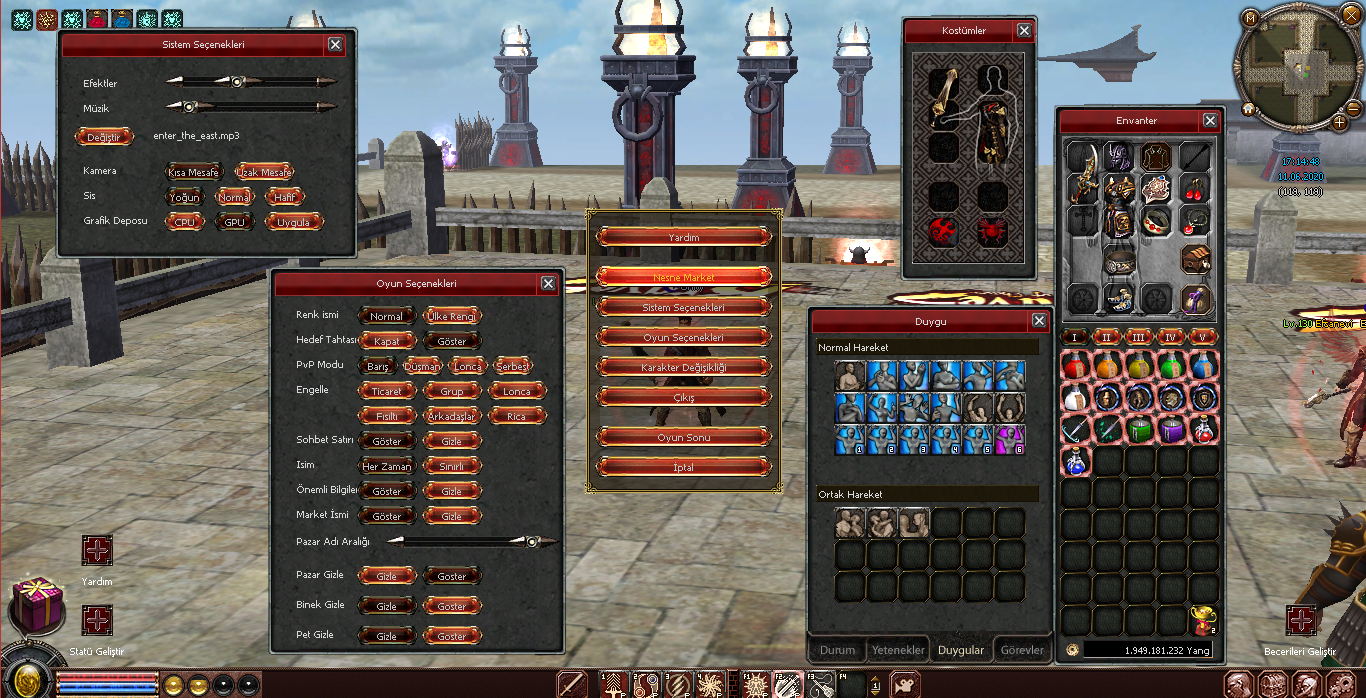
Bu interfaceyi kendi serverimiz için düzenlemiştim fakat
Daha iyisini yapacağım için bunu paylaşma kararı aldım iyi kullanımlar
İnterface 3 tane swnin interfacesinin karışımıdır.
Ziyaretçiler için gizlenmiş link,görmek için üye olmalısınız!
Giriş yap veya üye ol.
Ziyaretçiler için gizlenmiş link,görmek için üye olmalısınız!
Giriş yap veya üye ol.
ErenT - Yeni Interface Karma2 | Wom2 | NextWorld2
Metin2 dünyasında sürekli gelişen teknoloji ve kullanıcı deneyimi talepleriyle birlikte, client paketleri üzerinde yapılan yenilikler giderek daha önem kazanıyor. Bu bağlamda, Metin2Lobby ekibi tarafından geliştirilen ve özellikle PvP severler arasında büyük ilgi gören ErenT, hem görsel hem de işlevsel açıdan devrim niteliğinde bir arayüz dönüşümü sunuyor. ErenT, sıradan bir Metin2 client edit projesi değil; Karma2, Wom2 ve NextWorld2 gibi popüler modifikasyonları entegre ederek, kullanıcılara tek bir platformda farklı oyun deneyimleri sunan kapsamlı bir çözüm sunuyor.
ErenT’nin Temel Özellikleri
ErenT interface, sadece estetik değil, aynı zamanda performans odaklı tasarlanmıştır. Özellikle yüksek FPS desteği ve düşük sistem kaynak tüketimi sayesinde, eski donanımlara sahip oyuncuların bile sorunsuz bir şekilde oynamasına olanak tanır. Ayrıca, Karma2 modu ile gelen gelişmiş savaş mekanikleri, Wom2 ile optimize edilmiş ekran yönetimi ve NextWorld2 ile genişletilmiş harita desteği, bu paketi rakiplerinden ayırıyor. Tüm bu modüller, Metin2Lobby ekibi tarafından test edilmiş ve stabil hale getirilmiştir.
Nasıl Kurulur ve Kullanılır?
ErenT paketinin kurulumu oldukça basittir. İlk olarak, websitemizden en son sürümü indirin. Ardından, mevcut Metin2 client klasörünüzün yedeğini almanız önerilir. Paketi çıkardıktan sonra, içerisindeki setup.exe dosyasını çalıştırarak otomatik kurulumu tamamlayabilirsiniz. Alternatif olarak, manuel kurulum için readme.txt dosyasında detaylı talimatlar mevcuttur. Kurulum sonrası, oyun içi F10 tuşu ile arayüz ayarlarına erişerek, renk şemalarını, düzeni ve mod seçimini kişiselleştirebilirsiniz.
Hata Giderme ve Güncellemeler
Herhangi bir Metin2 client hata durumunda, öncelikle patch dosyalarının güncel olduğundan emin olun. Eğer sorun devam ederse, Metin2Lobby forumlarında bulunan support bölümü üzerinden destek talebinde bulunabilirsiniz. Ayrıca, ErenT paketi düzenli olarak güncellenmekte ve her yeni sürümde performans iyileştirmeleri ile birlikte yeni efektler ve skin seçenekleri eklenmektedir. Bu nedenle, otomatik güncelleme kontrolü özelliğini etkinleştirmeniz şiddetle tavsiye edilir.
Neden ErenT?
Piyasada birçok Metin2 pvp client ve Metin2 pack bulunsa da, ErenT’nin sunduğu entegre çözüm, kullanıcıların farklı modlar arasında geçiş yapmadan tek bir arayüzde keyifli vakit geçirmesini sağlar. Ayrıca, texture ve effect optimizasyonları sayesinde görsel kalite olduğu gibi oyun akışı da korunmuştur. Tüm bu özelliklerle ErenT, hem yeni başlayanlar hem de deneyimli oyuncular için ideal bir seçenektir.
ErenT - New Interface Karma2 | Wom2 | NextWorld2
In the ever-evolving world of Metin2, advancements in technology and user experience demands have made innovations in client packs increasingly important. In this context, ErenT, developed by the Metin2Lobby team and gaining significant attention among PvP enthusiasts, offers a revolutionary transformation in both visual and functional aspects. ErenT is not just another Metin2 client edit project; it provides a comprehensive solution by integrating popular modifications such as Karma2, Wom2, and NextWorld2, offering users diverse gaming experiences within a single platform.
Core Features of ErenT
The ErenT interface is designed not only for aesthetics but also for performance. Thanks to its high FPS support and low system resource consumption, it allows even players with older hardware to enjoy smooth gameplay. Additionally, advanced combat mechanics from the Karma2 mode, optimized screen management via Wom2, and expanded map support through NextWorld2 set this package apart from its competitors. All these modules have been tested and stabilized by the Metin2Lobby team.
How to Install and Use
Installing the ErenT package is straightforward. First, download the latest version from our website. It is recommended to back up your existing Metin2 client folder before proceeding. After extracting the package, run the included setup.exe file to complete the automatic installation. Alternatively, detailed instructions for manual installation can be found in the readme.txt file. Once installed, you can access the interface settings in-game by pressing the F10 key, where you can customize color schemes, layout, and mod selection.
[B>Troubleshooting and Updates[/B]
In case of any Metin2 client errors, first ensure that your patch files are up to date. If the issue persists, you may submit a support request via the support section on the Metin2Lobby forums. Moreover, the ErenT package is regularly updated, with each new version including performance improvements as well as new effects and skin options. Therefore, enabling the automatic update check feature is highly recommended.
Why Choose ErenT?
Although many Metin2 pvp clients and Metin2 packs are available on the market, ErenT’s integrated solution enables users to enjoy seamless gameplay across different mods without switching interfaces. Furthermore, texture and effect optimizations preserve both visual quality and game fluidity. With all these features, ErenT stands out as an ideal choice for both newcomers and experienced players.
