

Umarım hoşunuza gider özel mapler'e koymalık bir mob.
Beğenip yorum atarak bizleri daha çok teşvik edebilirsiniz.
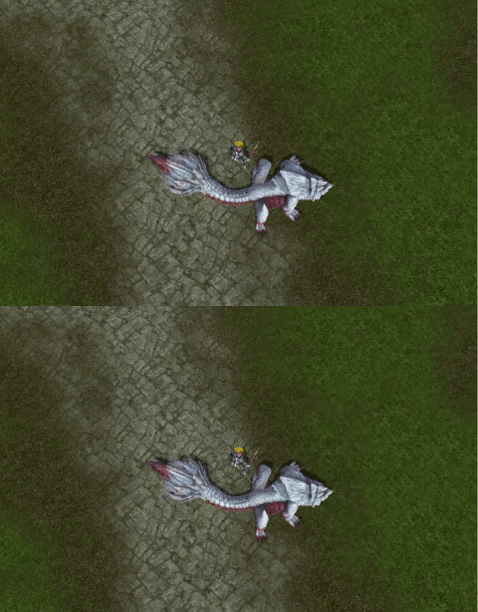
Beğenip yorum atarak bizleri daha çok teşvik edebilirsiniz.
F ❤R
Ziyaretçiler için gizlenmiş link,görmek için üye olmalısınız!
Giriş yap veya üye ol.
Ziyaretçiler için gizlenmiş link,görmek için üye olmalısınız!
Giriş yap veya üye ol.
Ziyaretçiler için gizlenmiş link,görmek için üye olmalısınız!
Giriş yap veya üye ol.
Ziyaretçiler için gizlenmiş link,görmek için üye olmalısınız!
Giriş yap veya üye ol.
Ziyaretçiler için gizlenmiş link,görmek için üye olmalısınız!
Giriş yap veya üye ol.
İndirme Linki:
Ziyaretçiler için gizlenmiş link,görmek için üye olmalısınız!
Giriş yap veya üye ol.
VT:
Ziyaretçiler için gizlenmiş link,görmek için üye olmalısınız!
Giriş yap veya üye ol.
Metin2 Killsot Ejderha Binek: 3D Modelleme ve Görsel Geliştirmeler
Metin2 Lobby olarak, Metin2 oyunu içinde yer alan özel bineklerden biri olan Killsot Ejderha Bineği'nin 3D modelleme ve görsel yönlerini detaylıca incelemek istiyoruz. Bu binek, oyuncular arasında popülerlik kazanmış ve özellikle model edit yapmayı seven kullanıcılar tarafından özelleştirilmeye değer bir örnektir. Killsot Ejderha, hem estetik hem de fonksiyonel açıdan dikkat çeker. Bu yazıda Killsot bineğinin 3D model yapısı, nasıl özelleştirileceği ve Metin2 için geliştirilmiş bazı görsel modifikasyonlar hakkında bilgi vereceğiz.
Killsot Ejderha Bineği Nedir?
Metin2 oyununda binek sistemleri, oyuncuların hızla seyahat etmesine yardımcı olurken aynı zamanda karaktere estetik bir değer de katar. Killsot Ejderha, bu bineklerden biridir ve ejderha temalı tasarımıyla dikkat çeker. Özellikle Metin2 3D model tasarımları ile özelleştirilmeye uygun bir yapıya sahiptir. Killsot, hem animasyonları hem de UV mapping yapısı ile 3D model editörleri tarafından tercih edilen modellere örnek teşkil eder.
Metin2 3D Model Edit ile Killsot Özelleştirme
Metin2 için geliştirilen 3D modeller, genellikle GR2 ya da Granny3D formatlarında gelir. Killsot Ejderha modeli de bu formatlardan biriyle çalışır. Bu model üzerinde değişiklik yapabilmek için Blender ya da 3DS Max gibi programlar kullanılır. Metin2 model edit yaparken dikkat edilmesi gereken bazı teknik detaylar vardır. Örneğin bones (iskelet) yapısının bozulmaması, mesh (yüzey) yapısının korunması gibi. Killsot modeli, bu anlamda iyi bir öğrenme aracıdır.
Killsot İçin Texture ve UV Map Uyumlu Tasarımlar
UV mapping, 3D modellerin dokularla uyumlu çalışması açısından hayati öneme sahiptir. Killsot Ejderha modeli için özel UV haritaları oluşturulabilir. Bu sayede özgün skin ve texture tasarımları kolaylıkla uygulanabilir. Metin2 için geliştirilen bazı texture pack dosyalarında Killsot modeli özel olarak yeniden tasarlanmıştır. Bu paketler, modelin görünümünü tamamen değiştirebilir. Özellikle visual mod olarak bilinen bu değişiklikler, oyun deneyimini zenginleştirir.
Ejderha Binek Animasyonları ve Rigging
Rigging işlemi, bir 3D modelin hareket kabiliyetini kazanması için yapılır. Killsot Ejderha modeli, bu konuda oldukça detaylı bir yapıya sahiptir. Metin2 animation dosyalarıyla uyumlu çalışır. Oyuncuların bineğe bindiği, havada süzüldüğü, iniş ve çıkış animasyonları gibi pek çok farklı hareket bu modele entegre edilmiştir. Bu animasyonların düzenlenmesi, modelin daha akıcı ve doğal hareket etmesini sağlar. Bone yapısı doğru şekilde ayarlanırsa, model üzerinde çok daha gelişmiş animasyonlar yapılabilir.
Metin2 Lobby Üzerinden Killsot Bineği Modelleri
Metin2 Lobby olarak, Killsot Ejderha bineğiyle ilgili özel model ve efekt dosyaları sunuyoruz. Bu dosyalar, hem custom model olarak hem de model replace yöntemiyle kullanılabilir. Kullanıcılar, kendi Killsot bineklerini özelleştirerek oyun içinde dikkat çekici bir imza atabilirler. Effect model ve building model gibi diğer nesnelerle uyumlu olması açısından, Killsot modeli profesyonel bir yapıya sahiptir.
Sonuç
Killsot Ejderha Bineği, Metin2 oyununda hem estetik hem de teknik açıdan önemli bir yere sahiptir. Metin2 3D modelleme ile bu bineği özelleştirmek isteyenler için hem öğrenme hem de uygulama açısından ideal bir altyapıya sahiptir. Metin2 Lobby, bu doğrultuda kullanıcılarına en kaliteli model edit, texture ve animasyon kaynaklarını sunmaya devam etmektedir.
Metin2 Killsot Dragon Mount: 3D Modeling and Visual Enhancements
Metin2 Lobby As part of our platform, we aim to examine in detail the 3D modeling and visual aspects of the Killsot Dragon Mount, one of the special mounts available in the Metin2 game. This mount has gained popularity among players and is considered valuable for customization by those who enjoy model editing. The Killsot Dragon attracts attention both aesthetically and functionally. In this article, we will provide information about the 3D model structure of the Killsot mount, how it can be customized, and some visual modifications developed specifically for Metin2.
What Is the Killsot Dragon Mount?
In the Metin2 game, mount systems not only allow players to travel faster but also add aesthetic value to the character. The Killsot Dragon is one of these mounts and stands out with its dragon-themed design. It particularly appeals to 3D model designers due to its compatibility with Metin2 3D models. With its animations and UV mapping structure, the Killsot serves as a preferred model for 3D model editors.
Customizing Killsot with Metin2 3D Model Editing
The 3D models developed for Metin2 usually come in GR2 or Granny3D formats. The Killsot Dragon model works with one of these formats. Programs such as Blender or 3DS Max are used to make changes to this model. There are certain technical details to consider when doing Metin2 model editing. For instance, ensuring that the bones structure remains intact and preserving the mesh structure. In this regard, the Killsot model serves as a good learning resource.
Texture and UV Map Compatible Designs for Killsot
UV mapping is crucial for ensuring 3D models work seamlessly with textures. Custom UV maps can be created for the Killsot Dragon model. This allows unique skins and textures to be applied easily. Some texture packs developed for Metin2 feature the Killsot model redesigned. These packs can completely alter the appearance of the model. Such modifications, known as visual mods, enrich the gaming experience.
Dragon Mount Animations and Rigging
Rigging is the process by which a 3D model gains movement capabilities. The Killsot Dragon model has a highly detailed structure in this respect. It works compatibly with Metin2 animation files. Many different movements like mounting, flying, landing, and dismounting are integrated into this model. Adjusting these animations ensures the model moves more fluidly and naturally. If the bone structure is correctly configured, more advanced animations can be implemented on the model.
Killsot Mount Models via Metin2 Lobby
As Metin2 Lobby, we offer special model and effect files related to the Killsot Dragon mount. These files can be used both as custom models and via the model replace method. Users can customize their own Killsot mounts and leave a distinctive mark in the game. With its compatibility with other objects like effect models and building models, the Killsot model has a professional structure.
Conclusion
The Killsot Dragon Mount holds significant importance in the Metin2 game both aesthetically and technically. It offers an ideal infrastructure for learning and application for those wishing to customize this mount through Metin2 3D modeling. Metin2 Lobby continues to provide users with the highest quality model editing, texture, and animation resources in this direction.
