

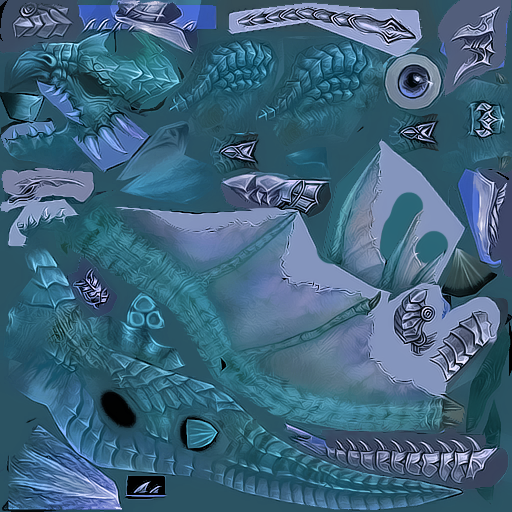
Merhaba Arkadaslar Bugün Sizlere SaltanatMt2 Deki Zırhlı Ejderi (Mavi) Olanı Verecegim
İNDİRME LİNK :
BİR TEŞEKKÜRÜ COK GÖRMEYİN
KONU HEP GÜNCEL.
İNDİRME LİNK :
Ziyaretçiler için gizlenmiş link,görmek için üye olmalısınız!
Giriş yap veya üye ol.
(GÜNCELLENDİ)
Ziyaretçiler için gizlenmiş link,görmek için üye olmalısınız!
Giriş yap veya üye ol.
BİR TEŞEKKÜRÜ COK GÖRMEYİN
KONU HEP GÜNCEL.
Saltanat Tipi Mavi Zırhlı Ejder Görünüm
Saltanat Tipi Mavi Zırhlı Ejder Görünüm, Metin2 oyuncuları arasında efsanevi statü sembollerinden biridir. Bu görünüm, sadece görsel açıdan etkileyici değil, aynı zamanda oyuncunun gücünü, becerisini ve in-game başarılarını yansıtan bir işaret olarak kabul edilir. Özellikle PvP alanlarında veya büyük savaşlarda bu zırh, düşmanlar üzerinde psikolojik baskı yaratırken, sahibine özgüven katar.
Bu eşsiz görünüm, genellikle özel eventler, yüksek seviye görevler veya seçkin bosslardan düşen nadir eşyalarla elde edilir. Ancak birçok oyuncu için en büyük engel, bu görünümün özel bir client veya pack ile çalıştırılması gerekliliğidir. İşte bu noktada Metin2Lobby gibi güvenilir platformlar devreye girer. Sitemizde, Saltanat Tipi Mavi Zırhlı Ejder Görünüm'ün aktif olarak kullanılabilmesi için gerekli olan özel client paketleri, düzenli güncellenen yamalar ve kullanıcı dostu kurulum rehberleri sunulmaktadır.
Nasıl Elde Edilir ve Kullanılır?
Saltanat Tipi Mavi Zırhlı Ejder Görünüm'ü kullanabilmek için ilk adım, uyumlu bir Metin2 client veya Metin2 pack indirmektir. Bu paketler genellikle texture, effect ve model dosyalarını içerir. Örneğin, Martysama client veya Metin2Dev client gibi popüler özel client’ler bu görünümü destekleyebilir. Ancak her client aynı görünümü sunmaz; bu yüzden Metin2 Lobby üzerinden güncel ve test edilmiş paketleri tercih etmek önemlidir.
İndirme işlemi tamamlandıktan sonra, Metin2 client kurulum adımları takip edilmelidir. Bu süreçte dikkat edilmesi gereken en önemli nokta, client dosyalarının orijinal yapısına zarar vermeden entegre edilmesidir. Aksi takdirde oyun açılmaz veya hata verir. Bu nedenle sitemizde yer alan Metin2 client yama ve Metin2 client patch rehberleri, adım adım anlatılarak oyunculara kolaylık sağlanır.
Neden Metin2Lobby?
Metin2Lobby, sadece indirme linkleri değil, aynı zamanda Metin2 client hata çözümü, Metin2 client fix ve Metin2 client update gibi kritik destek içeriklerini de sunar. Özellikle Saltanat Tipi Mavi Zırhlı Ejder Görünüm gibi nadir görünümlerde, dosya bütünlüğü ve uyumluluk çok önemlidir. Sitemizde paylaşılan her paket, anti-virüs testinden geçirilmiş ve çalışma garantisiyle sunulmaktadır.
Ayrıca, Metin2 pvp client ve Metin2 pvp pack kategorilerimizde, bu görünümün PvP performansına etkisi de detaylı şekilde analiz edilmiştir. Örneğin, mavi ışık efektleri düşmanın görsel algısını bozabilir veya hareket hızı hissini artırabilir — bu tür detaylar, ileri seviye oyuncular için kazanım farkı yaratır.
Imperial Blue Armored Dragon Appearance
Imperial Blue Armored Dragon Appearance is one of the legendary status symbols among Metin2 players. This appearance is not only visually impressive but also regarded as a sign of a player's strength, skill, and in-game achievements. Especially in PvP arenas or large-scale battles, this armor creates psychological pressure on enemies while boosting the wearer's confidence.
This unique appearance is usually obtained through special events, high-level quests, or rare drops from elite bosses. However, the biggest challenge for many players is that this appearance requires a custom client or pack to function. This is where trusted platforms like Metin2Lobby come into play. On our website, we offer custom client packages, regularly updated patches, and user-friendly installation guides necessary to activate the Imperial Blue Armored Dragon Appearance.
How to Obtain and Use It?
To use the Imperial Blue Armored Dragon Appearance, the first step is to download a compatible Metin2 client or Metin2 pack. These packages typically include texture, effect, and model files. For example, popular custom clients like Martysama client or Metin2Dev client may support this appearance. However, not every client offers the same visuals; therefore, it's crucial to choose updated and tested packages from Metin2 Lobby.
After completing the download, follow the Metin2 client installation steps. The most important point during this process is to integrate the files without damaging the original client structure. Otherwise, the game may fail to launch or produce errors. That’s why our site provides detailed Metin2 client patch and Metin2 client yama (patch) guides to assist players step by step.
Why Metin2Lobby?
Metin2Lobby doesn’t just offer download links — we also provide critical support content such as Metin2 client error solutions, Metin2 client fixes, and Metin2 client updates. Particularly for rare appearances like the Imperial Blue Armored Dragon, file integrity and compatibility are vital. Every package shared on our site undergoes antivirus testing and comes with a working guarantee.
Additionally, in our Metin2 PvP client and Metin2 PvP pack categories, we analyze in detail how this appearance affects PvP performance. For instance, the blue light effects might disrupt an opponent’s visual perception or enhance the sensation of movement speed — such details can make a decisive difference for advanced players.
